Nikon D2H goes to pieces
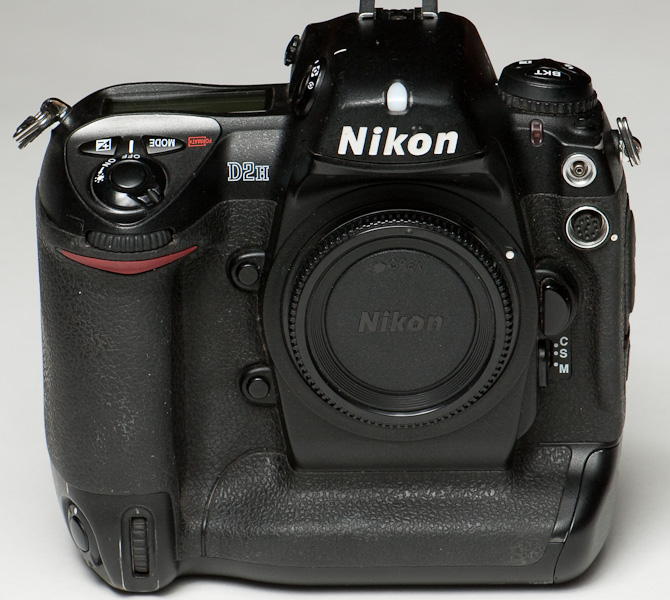
If you’re curious like me, you’ve wondered what’s inside your camera, especially a pro DSLR. So, of course, I couldn’t resist the idea of a “teardown project” with this broken Nikon D2H. I really wanted to see if I was up to the task of replacing the shutter – get it working again, not just tear it apart.
Planning to try this yourself? I’d like to hear from you – drop me a note below!
Click images for large versions
Note: I finished the repair, and it works! This post is a work-in-progress – I’ll resume updates in a few days when some cosmetic parts arrive to finish the project.
Note to self… Don’t use the “bulb” shutter speed when cleaning the sensor. This D2H’s owner couldn’t keep his finger on the button – the shutter was destroyed when it closed on his cleaning tool.
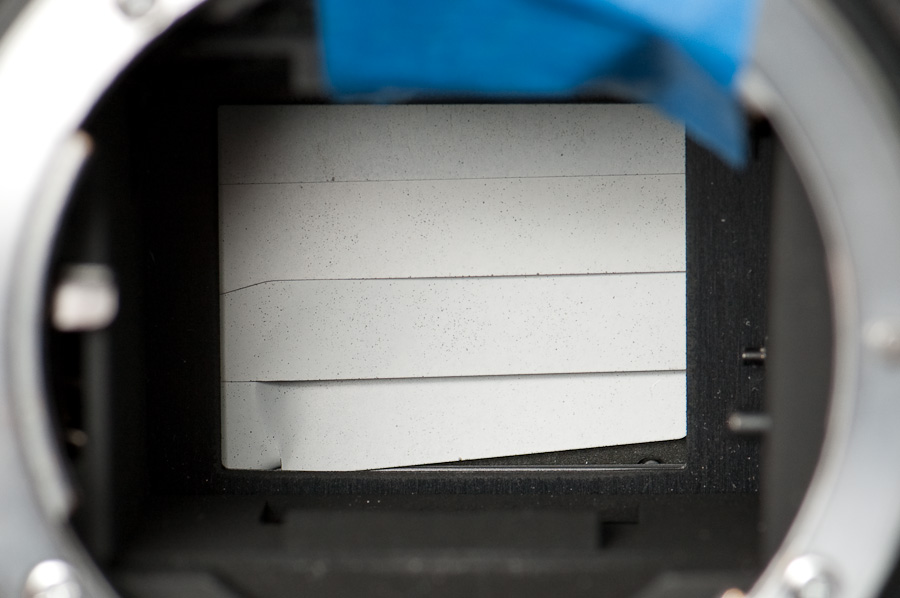
Now, having the shutter replaced isn’t a cheap proposition – it’s around USD$350. However, Nikon will sell you a new shutter mechanism for USD$100. (I bought through my local repair shop, but the Nikon Parts Department also sells direct if you know the part number.) As an avid do-it-yourself guy the challenge was irresistible, and the lure of getting a like-new D2H for $100 was too tempting. Plus, it was a great excuse to take apart a top-end camera.
Surprisingly, I found virtually no documentation on the web to help with this project – no how-to guides, no pictures inside a D2H. Since I’m taking copious photos anyway to help with re-assembly, I decided to share them here for your entertainment.
A point of interest: the D2X is reported to be the same camera with improved electronics, so what I’ve documented here should apply equally for the D2X.
Tools required
- #0 Philips screwdriver
- A small hard toothbrush, for scrubbing
- Plastic scraper – something small and hard to scrape the grip adhesive off (or a strong fingernail)
- Painter’s tape – like 3M’s blue tape that doesn’t leave residue
- Sharpie marker for labeling the tape
- Isopropyl alcohol (rubbing alcohol) swabs – 70% strength works fine
Replacement shutter (USD$100)
Here’s a look at the replacement shutter module; it comes as a complete assembly. It’s mechanically pretty complex, and fairly heavy too. I’m looking forward to getting another 150,000 clicks out of this body.
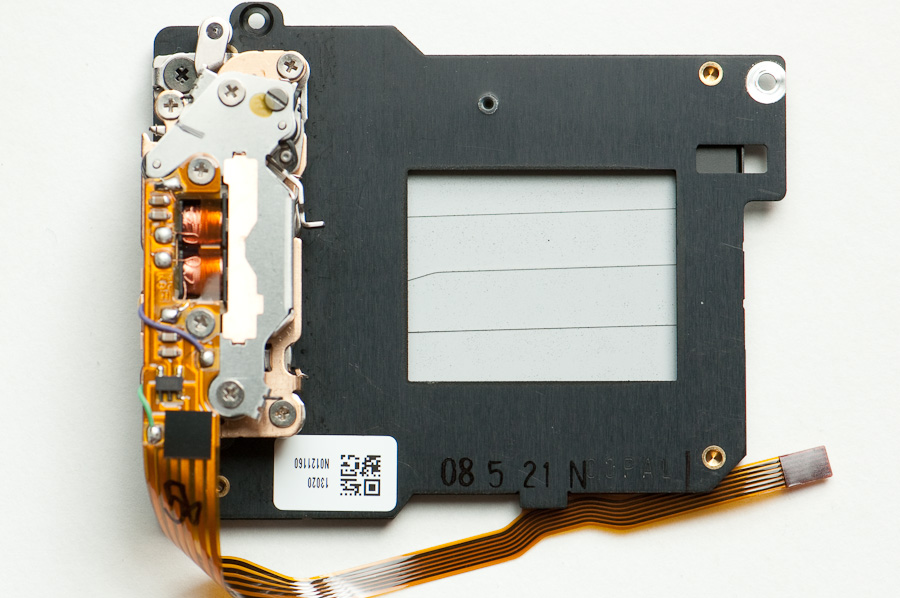
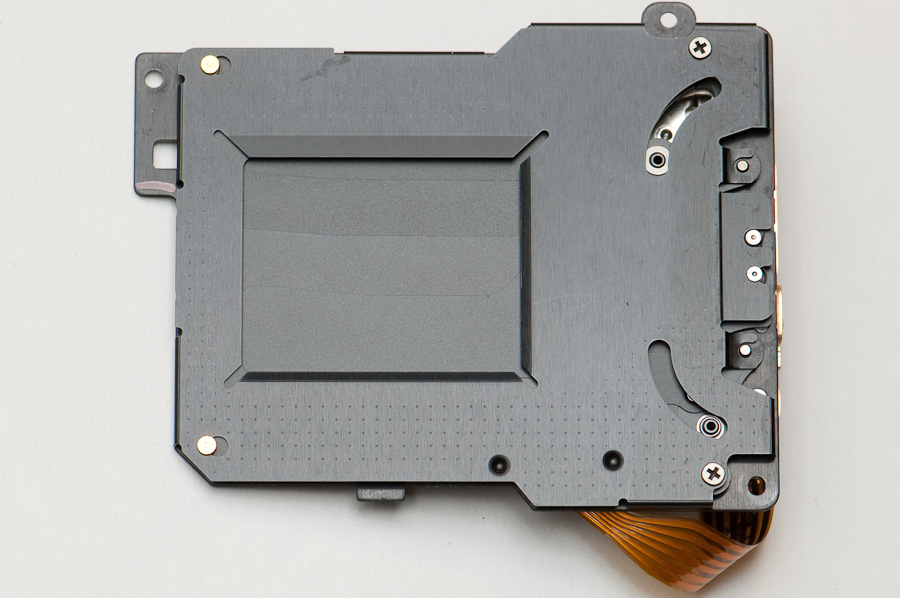
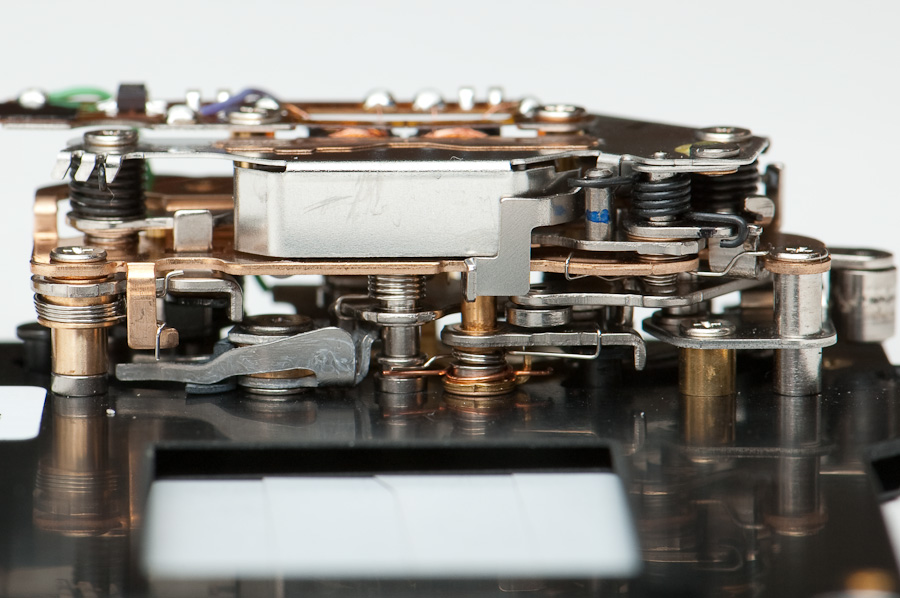
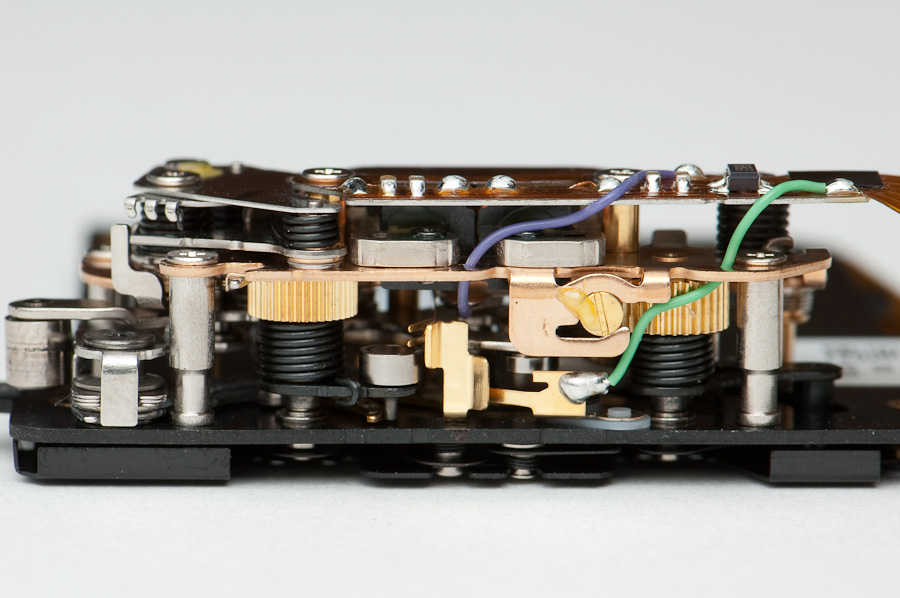
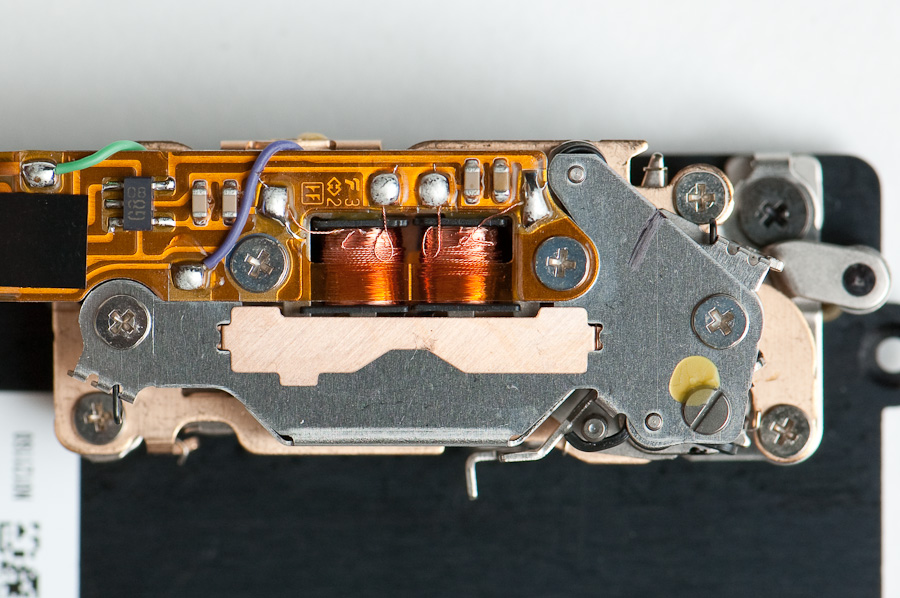
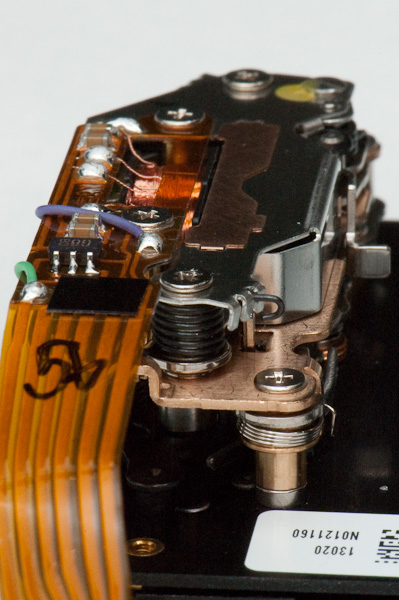
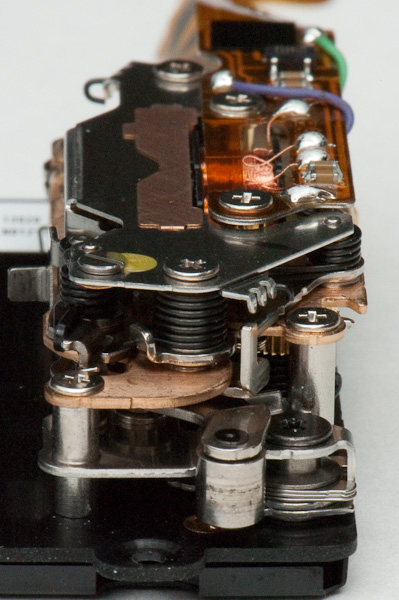
It’s not obvious whether this mechanism mounts from the front or the back, but it doesn’t look too daunting – the real challenge will be figuring out how to disassemble the camera to get to this module (e.g., whether it gets accessed via the front or back of the body). I’m hoping it’s accessible from the front, because there are more fragile electronics to work around in the back.
The electronics on the module are very simple – just electromechanical, really. The only chip package appears to be a power switch used to energize the magnetic coils that drive the shutter. So, the memory chip that holds the number of shutter clicks does not appear to be stored in the shutter itself, which means if the shutter count is being reset after a shutter replacement, it’s being done via software – if so, that’d mean it’s possible to “roll back the odometer” fraudulently; if the counter doesn’t get reset after a shutter replacement, it means you can’t really know if the shutter has been replaced like a seller might claim. Hmmm. If you’ve had Nikon replace the shutter in your camera, please let me know – was the ShutterCount reset to zero when you got it back?
First, strip it down
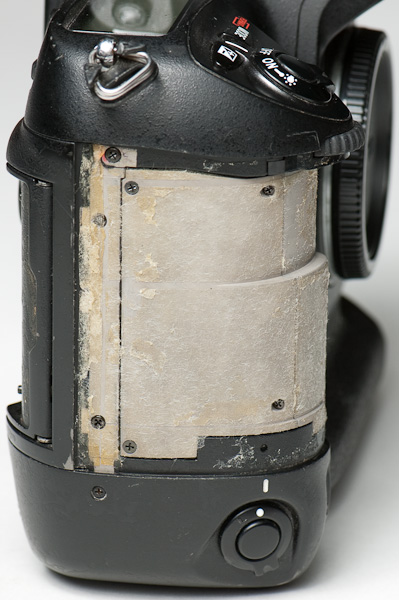
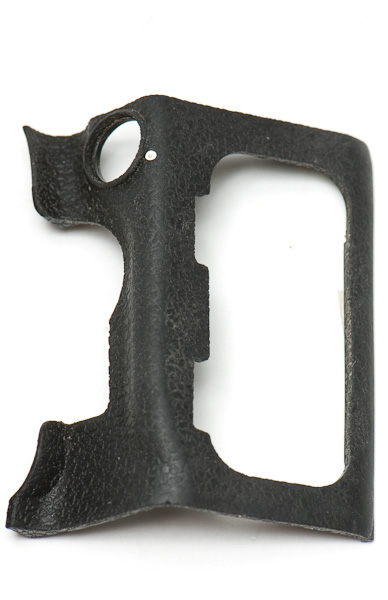
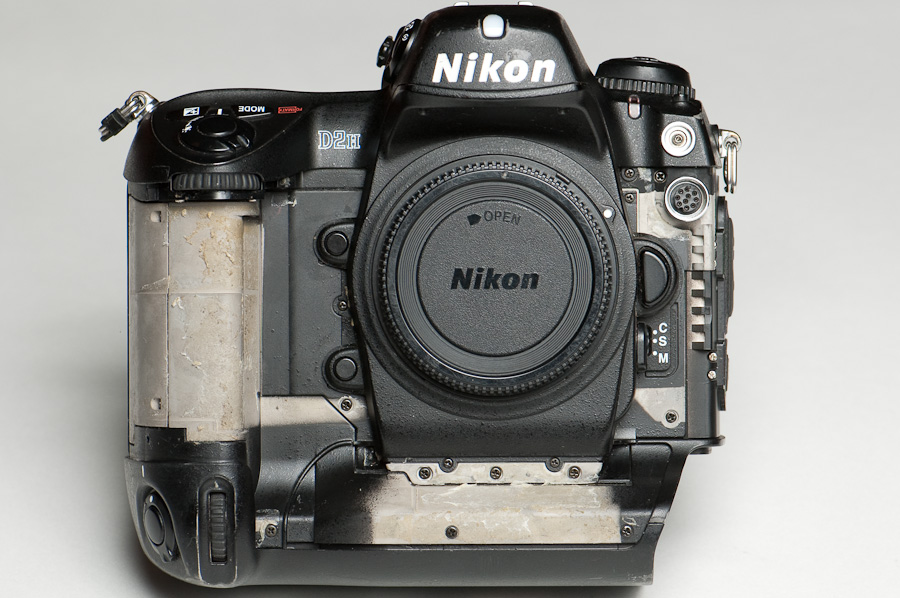
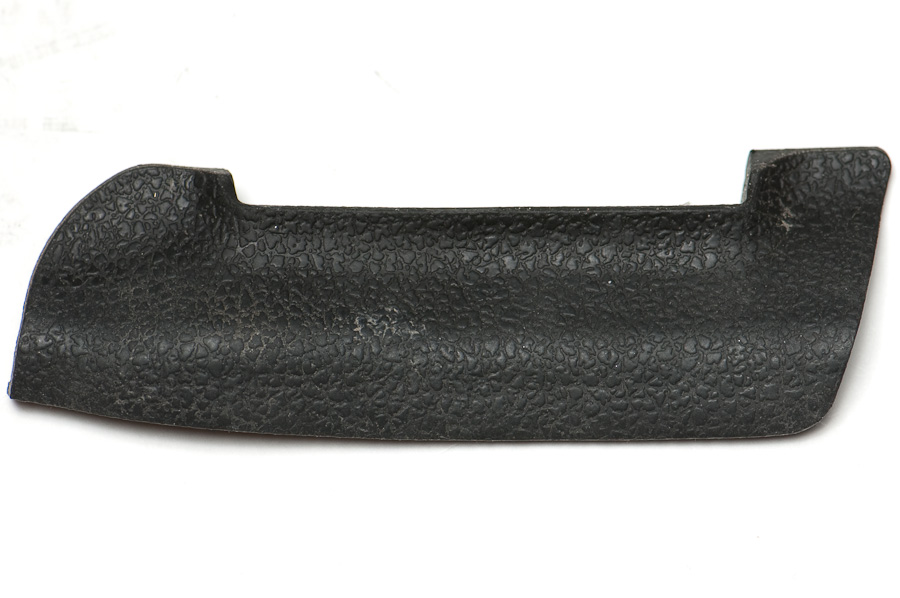
You’ll notice the D2H case only has 6 exposed screws. Looks are deceiving… there are actually 25 more screws hidden underneath the grip rubber. Yep, that’s right – you have to peel off the grips to disassemble the camera.
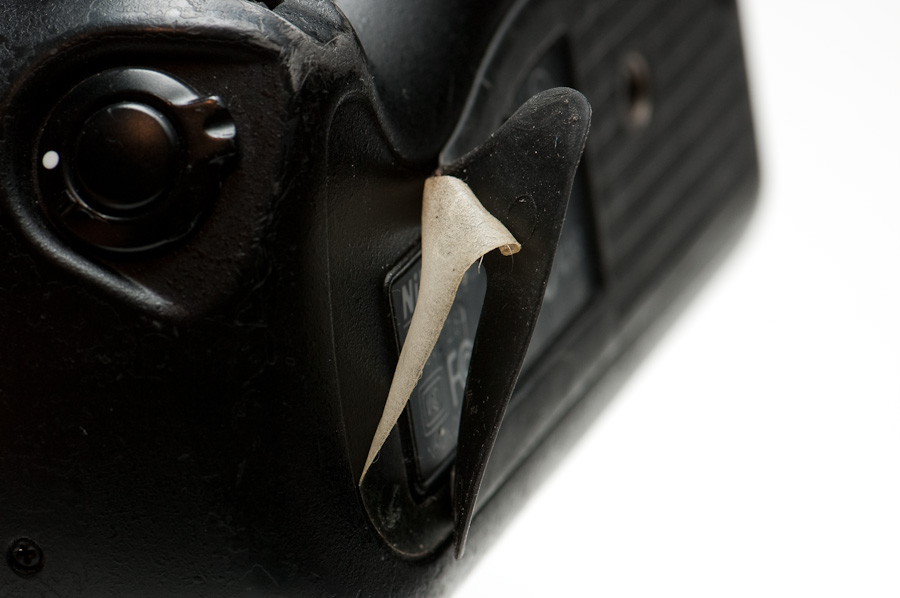
Not finding any info on the web, I didn’t know about the other 25 screws and I was really hesitant to start peeling off the grip rubber. After I saw replacement grips for sale on eBay, I had a little more confidence so I peeled a section back for a peek. Jackpot! And it was surprisingly easy too.
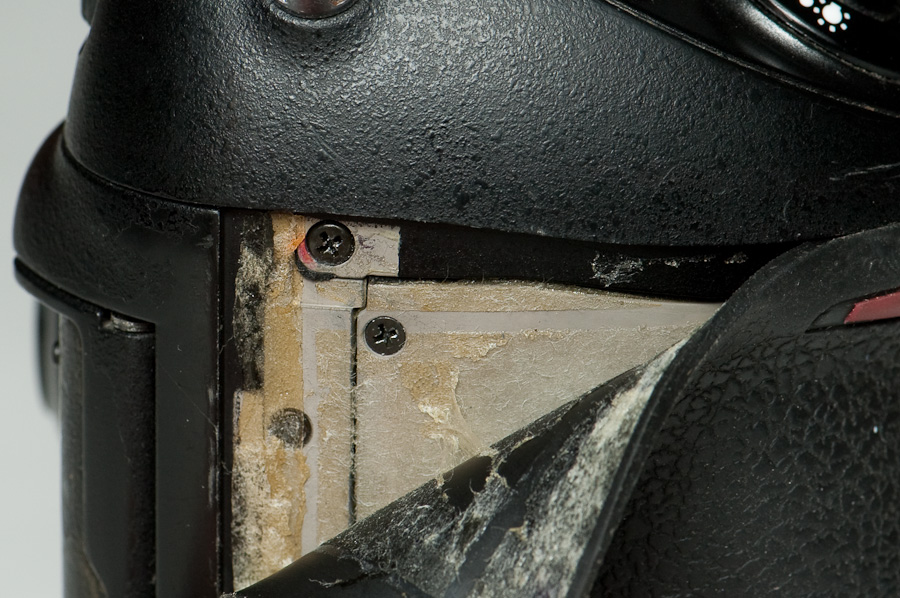
Jumping in with both feet, I removed all the grip rubber, taking care not to stretch or damage the pieces. (Although you can buy replacements from Nikon, a full set costs about USD$75. Nikon installs new grips when they do a shutter replacement, which is one reason the repair costs USD$350.) The factory adhesive is thin strips of material – I scraped most of it off with my fingernail then used alcohol wipes to remove the residue. Don’t use a metal scraper, since it’ll scratch.

Saving the screws
One of the first challenges here is organizing all the parts so you get the right screws back in the right holes – the screws are different sizes and lengths, so don’t mix them up. And taking a lot of pictures can be valuable when it comes time for re-assembly.
Here’s my technique: Foremost, be very methodical – don’t go hog-wild and unscrew everything. Remove screws for one component at a time (e.g., the bottom) and put that part back together as soon as you can. As you remove screws, lay them out left-to-right in the order they’re installed, then tape them down to your work surface (or the inside of a parts bin) using a piece of painter’s tape; label the tape with the part they were removed from, and mark dots on the tape to show placement of the screws. Now you’ll be able to put every screw back in its original hole.
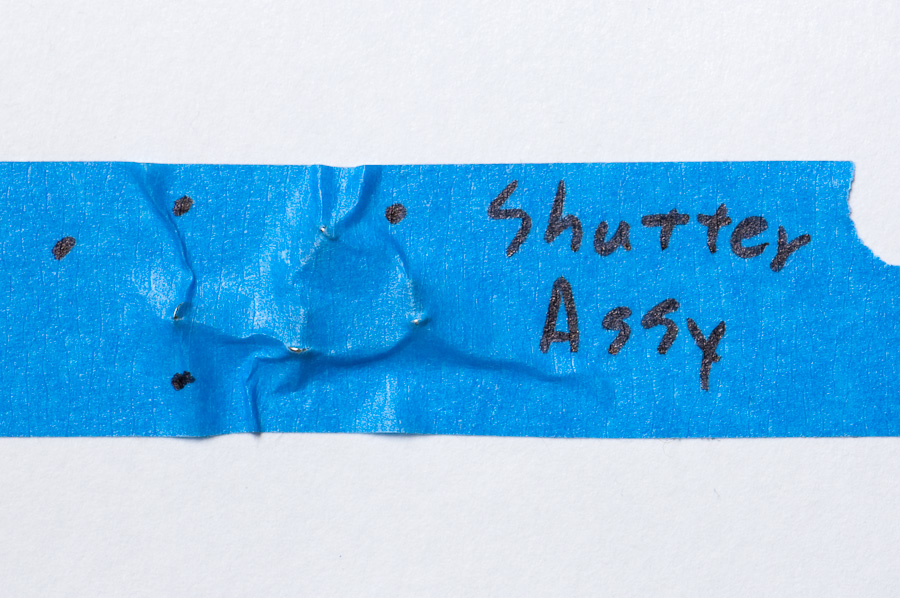
Battery grip
My first venture was to open the battery case and see how much was accessible. Removing the bottom takes 6 screws – the three exposed ones on the back and right side, then three more on the front, hidden under the rubber apron.
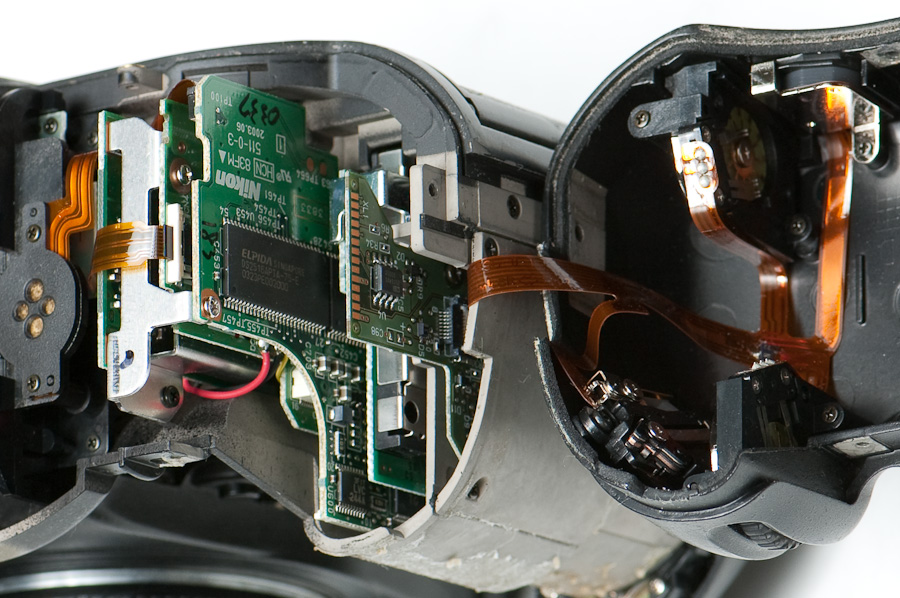
I didn’t find much of interest here, at least for replacing the shutter assembly. There don’t appear to be any screws inside that are essential to disassembling other parts. There’s a metal access panel that looks curious on the bottom of the body inside the battery cavity, but it’s not the right shape or size for accessing the shutter mechanism. It didn’t open easily, so I stopped and reassembled the bottom.
Inside the back
The camera back proved very easy to open – there are two screws on each end of the rear panel, just under the grip rubber on each side. Lift the panel off carefully – there’s a flexible circuit board connecting the rear panel to the body. Although these strips can be unplugged, I try to avoid it.
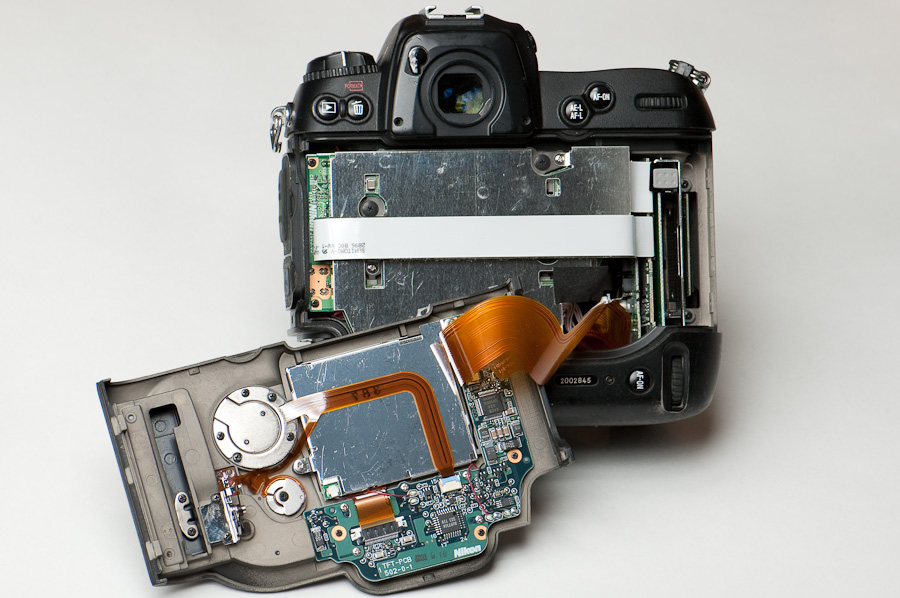
There’s a large metal cover over the main electronics, likely to shield electromagnetic interference – from leaking out (for regulatory compliance) and from leaking in (affecting the sensor’s accuracy). There are a couple large grey screws that I suspect mount the main sensor circuit board – I wasn’t too eager to unscrew that PCB at this point because I didn’t want to start unplugging ribbon cables, and I wasn’t sure if I’d create any alignment problems for the sensor.
On the back side of the rear panel are circuits to drive the LCD screen and the control buttons.
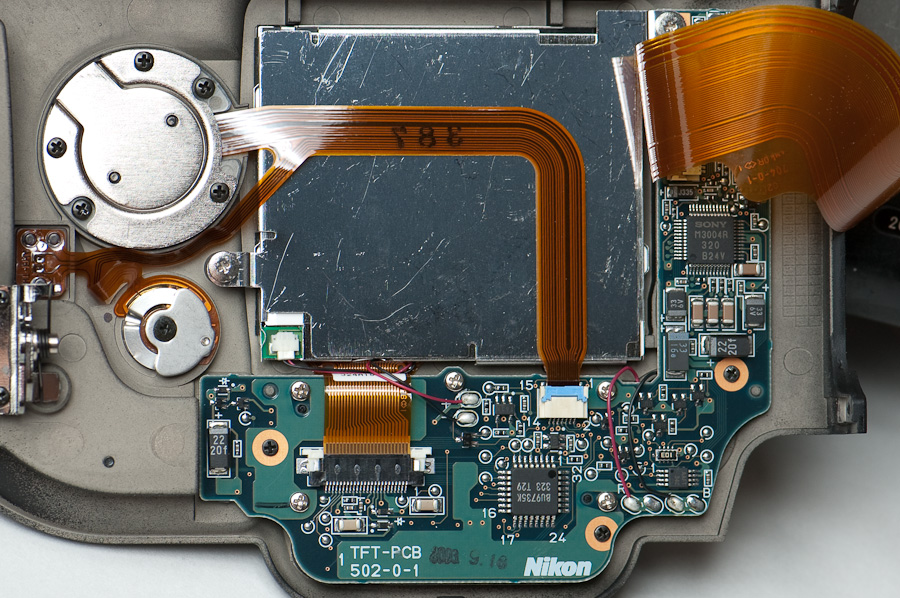
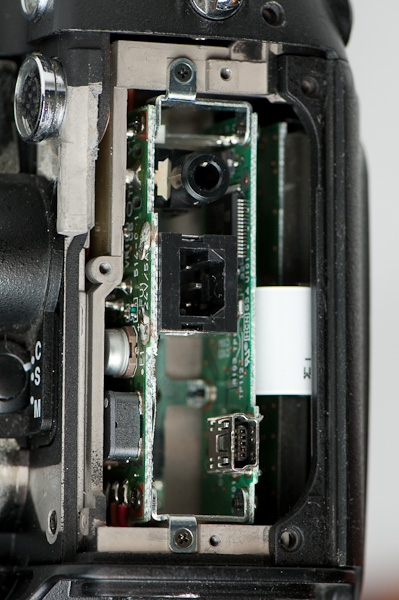
On the left side of the main body is a pair of small PCBs for the power input, USB jack, and video out. The white strip across the back is a ribbon cable that connects the USB and video ports to the circuit boards on the right side.
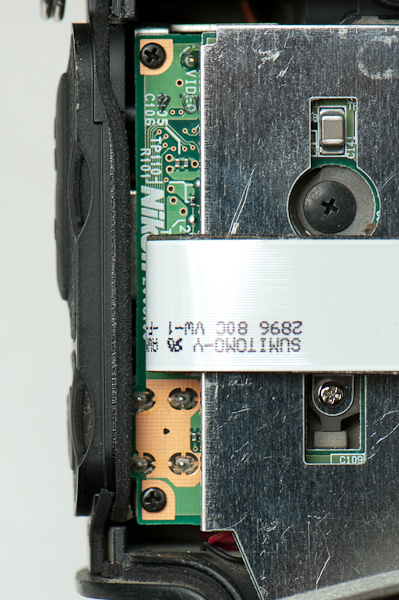
On the right side is the CompactFlash socket, plus several circuit boards installed parallel to the CF slot.
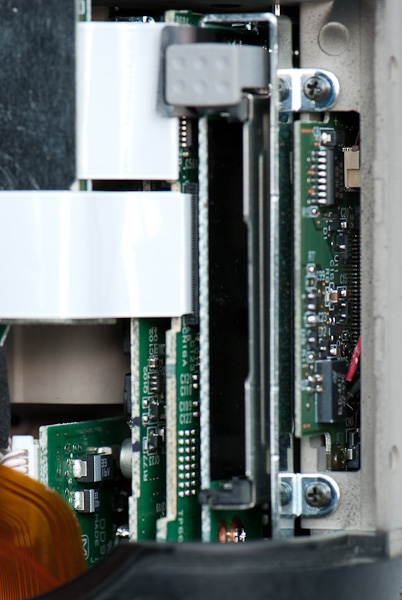
USB & video ports
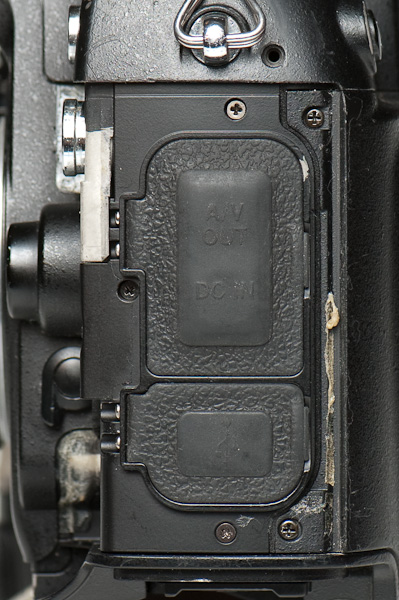
The connector panel on the left side of the camera is trimmed with a panel using 3 screws (top, bottom, and left). Behind the panel, there are 2 circuit boards connected together. The white ribbon cable connects to one of them. I left this assembly intact because it also has several soldered wires for power running in other directions.
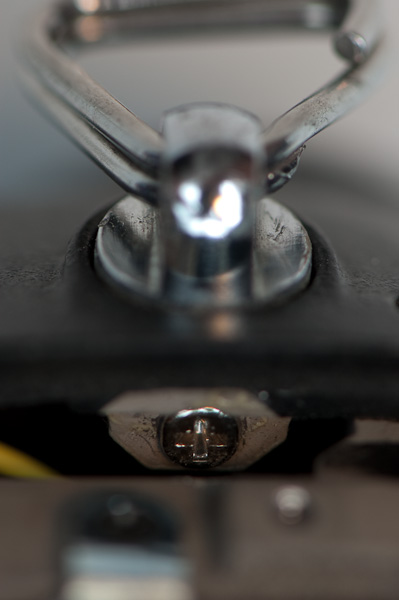
Strap eyelets
The strap eyelets are fitted into place and held with a screw through their side, so the screw holds them in place but doesn’t bear the load. This camera happened to have a loose strap mount near the USB jack, and I was able to reach the screw once the USB panel was removed. Normally, the best way to access the strap mounts is by removing the top of the body.
Losing the “lid”
The top of the camera body is fastened with 5 screws – one exposed near the strap eyelet on the right side (when looking at the camera face), one under the rubber near the 10-pin connector, two on the face under the Nikon logo, and one under the rubber on the left side below the strap eyelet.
The top cover lifts straight up, but there’s a catch, literally – the diopter adjustment knob sticks through the cover and keeps it from being removed. The center of the diopter knob has a removable cap with a screw hidden underneath – this had me stumped for a while, until I found a D2H parts list online (see Resources, below). The diopter knob’s cap can be pried off by inserting a pointed knife (e.g., X-acto) into the seam at the edge of the knob. Mine was apparently glued on (and a bit crusty) so the seam wasn’t obvious, but the cap popped off easily. See Figure 15 in the D2H Parts List PDF for an exploded view.
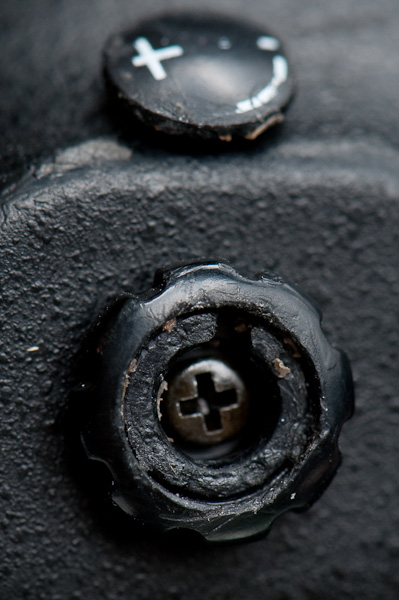
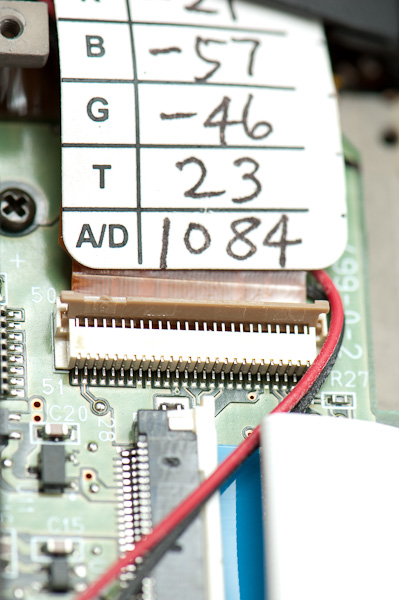
The top can be lifted off after removing the diopter adjustment knob, but there’s very little slack in the ribbon cable connecting the top to the body. Before removing the top, open the side panel on the grip – this provides more slack in the ribbon cable. The right side of the panel is sealed with a strip of grip adhesive, so it takes a little prying from the left side. The ribbon cable can be disconnected by unlatching its connector there, but I don’t recommend it – there are still power wires soldered in place. (The second close-up here shows how to unlatch the connector to remove the ribbon cable.)
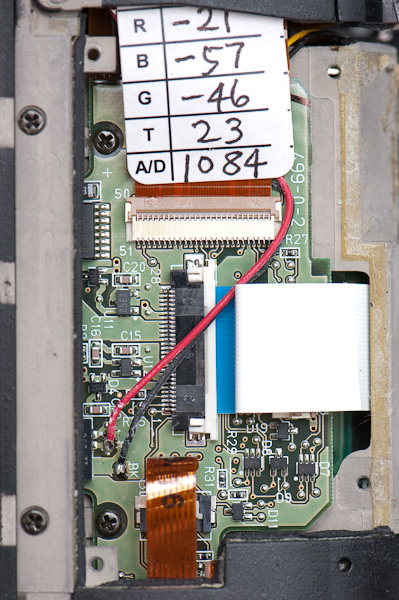

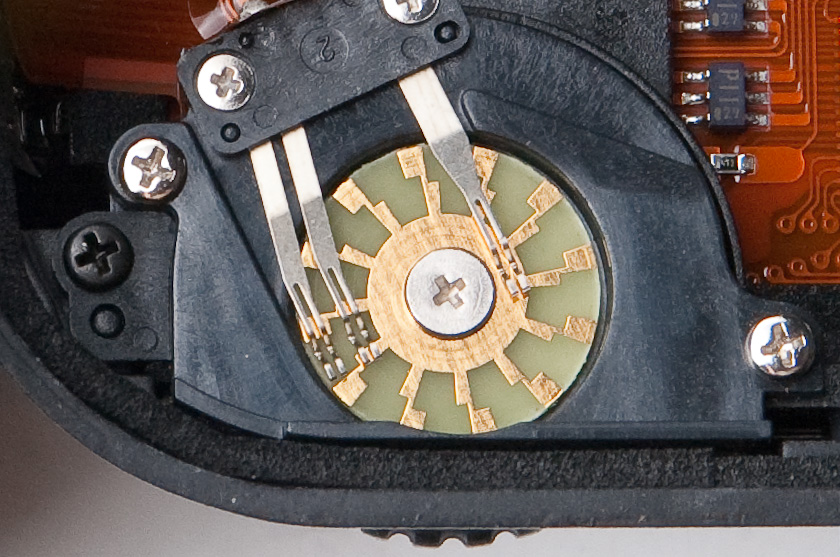
As a side comment, I’m impressed by some of the little details. For example, the mechanism used for the thumbwheels is simple but effective. In this image, there are 3 “wiper” contacts to detect thumbwheel motion – the wiper near the center is the “common” lead (typically supplying a fixed positive or ground voltage); the outer two wipers detect movement when they touch the outer pads on the pinwheel pattern. Notice the staggered pattern on the pinwheel – depending on which wiper (A or B) makes contact first, the camera can detect which direction the wheel is being turned (e.g., AB-AB-… vs. BA-BA-…) and how many steps. A slick touch is the 2-pronged fork – wipers can break or wear down in one spot, so having two fingers on the wiper yields better reliability and longevity.
You might also notice the foam strip around the edge of the body – this is the weather seal you hear about on the pro bodies. It’s a thin strip of dense foam set in a groove along the seam, and every seam on the D2H has this seal.
Viewfinder
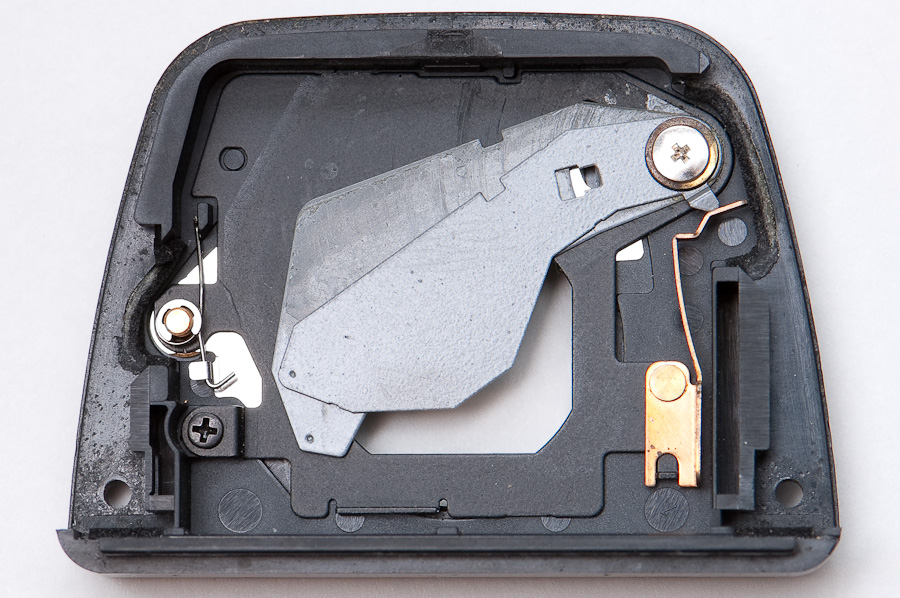
Once the top is removed, the viewfinder frame comes off easily with two external screws near the eyepiece. On the backside you can see the blade mechanism for shuttering the viewfinder. There’s also a clever latch that keeps eyepieces from coming unscrewed unless the shutter is closed.
Optics assembly
From the D2H Parts List PDF I just found, it looks like the face of the camera should detach in one assembly along with the upper electronics. The shutter module should be mounted just behind it. See Figure 3 of the D2H Parts List PDF (below) for an illustration.
Studying the exploded diagrams in the D2H Parts List, it looks like the flexible circuit board on top of the camera needs to be removed first, along with the rigid circuit board on top of the grip. Then, the lens mount and viewfinder assembly can be removed intact, followed by the auto-focus motor module – then the shutter module can be replaced. This will require a series of delicate steps with the circuit boards.
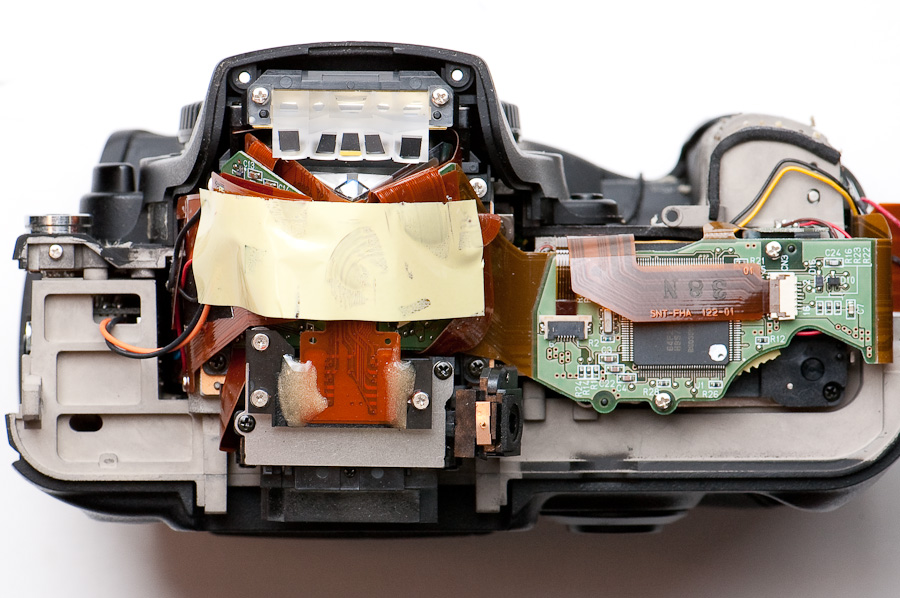
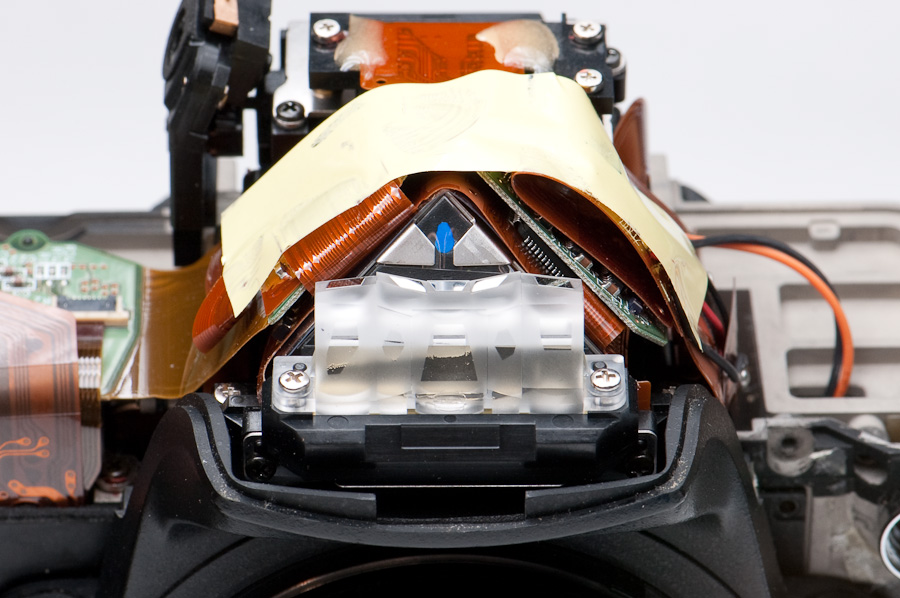
Remove the upper printed circuit boards (PCBs) – On top of the prism is a strip of yellow tape that holds the flexible (brown) PCBs in position. Carefully peel back the yellow tape right-to-left, leaving the left end attached. The tape remains attached to a flexible PCB on the left side of the prism – gently pull that flexible PCB to the left and it’ll disconnect from the rigid (green) PCB underneath.
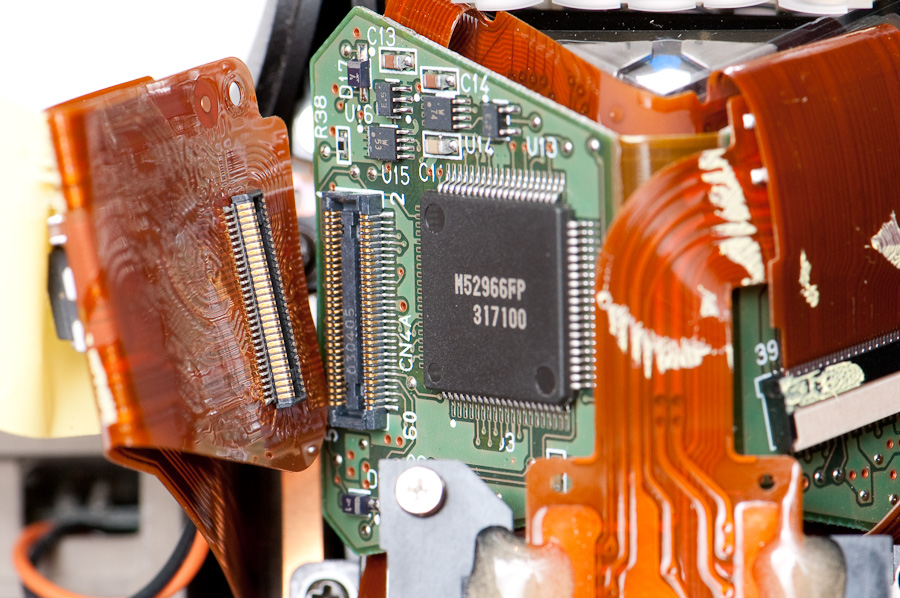
On the top right side of the prism is another narrow flexible PCB that also needs to be disconnected. This one slides directly out of the connector by gently pulling and wiggling it. During re-assembly, I discovered that the black section on the connector slides out to release the cable (it doesn’t pivot up or come off).
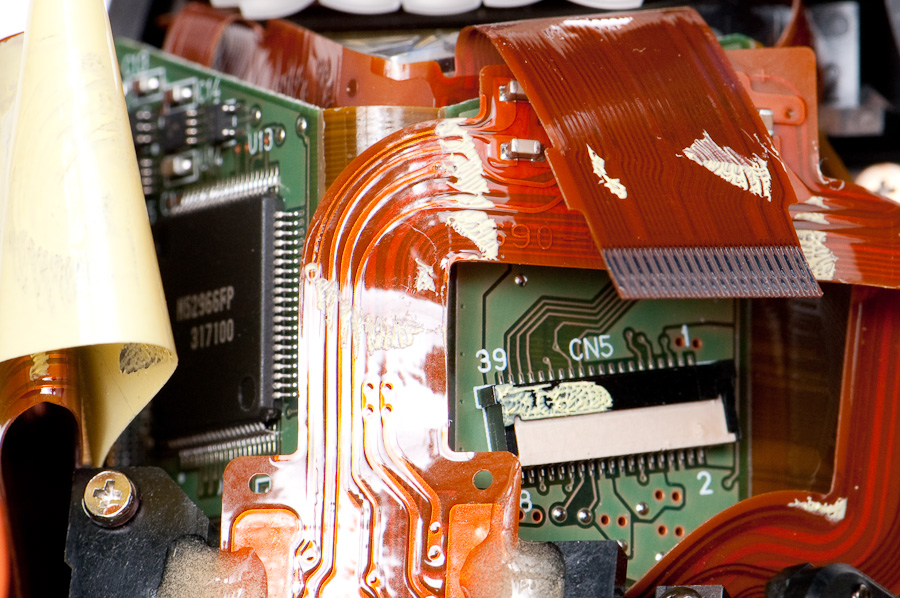
On top of the grip area is a remaining rigid PCB with two flexible PCBs that connect to it and route down the front of the body. The small flexible PCB is the control cable for the shutter module – to disconnect it, very carefully unclip the tan part (one clip on each side) and slide it out of the PCB socket; this clip is probably the most fragile piece on the camera, so use care. The wider flexible PCB goes to the motor module, and it attaches to a latching connector on the right of the grip PCB – unlatch the connector by flipping the dark brown part up. Remove the 3 screws from the grip PCB, and also one screw from the face of the body where a tiny PCB is connected to the grip PCB.
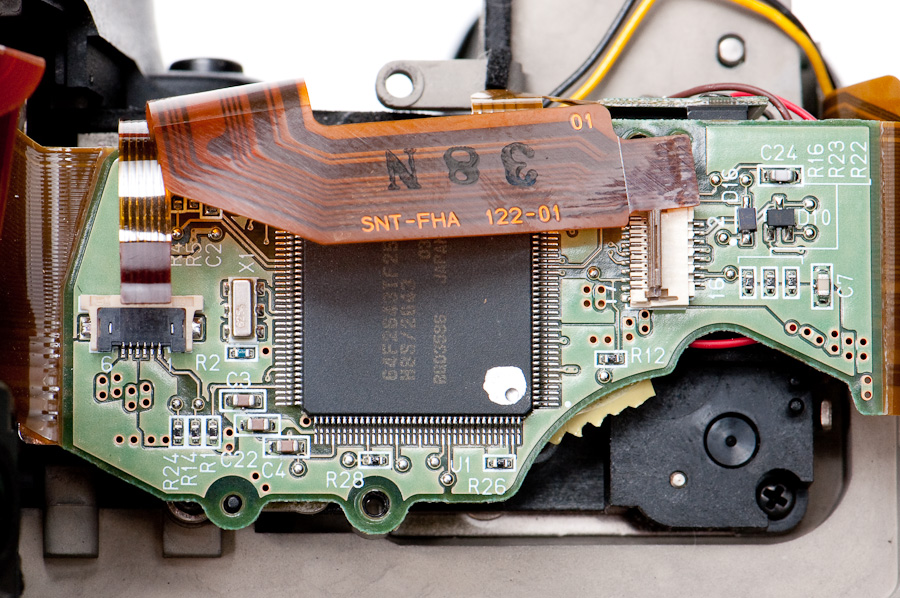
With these flexible PCBs disconnected, the tented green PCB can be gently lifted off the top of the prism, and the green grip PCB can also be lifted off and moved to the side. Be careful of the soldered wires from the tiny PCB – they connect to the motor module. Also take care not to damage or stress the flexible PCBs, particularly where they connect to the rigid PCBs. Now the optics assembly is able to be removed.
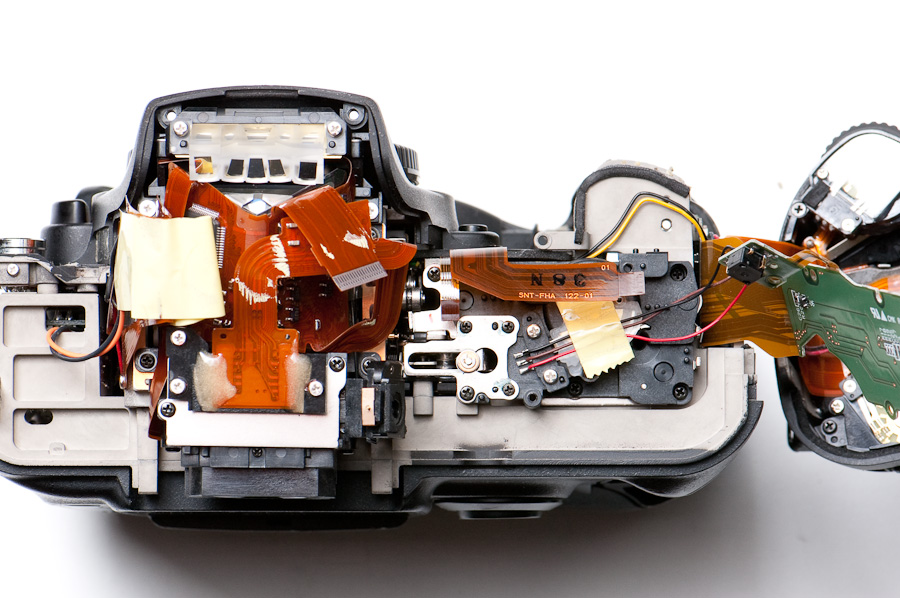
Remove the screws – The optics assembly is fastened with 6 screws on the face of the D2H – 3 along the bottom, one on the left, and two on the right. Two more screws are on the back of the camera, underneath the viewfinder on each side. (The rear screws are stiff because they were assembled with thread lock.) Finally, there is one screw from the top, under the forward-left corner of the grip PCB that was removed.
Detach the optics assembly – Eureka! The entire optics assembly lifts off in one piece, except for a pair of orange & black wires attached to the left PCB on top of the prism. As with the other parts, it can be laid to one side without disconnecting these soldered wires.
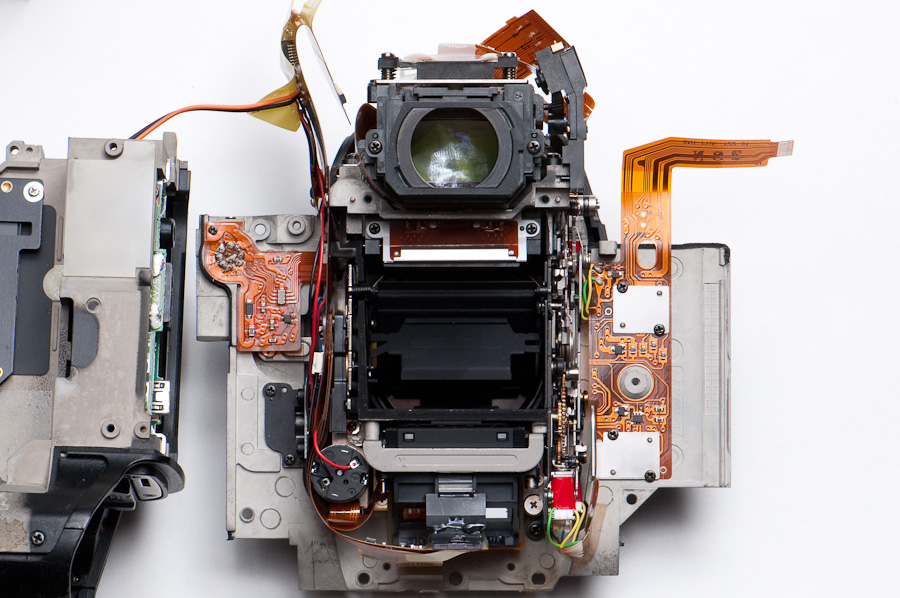
With the optics assembly removed, the shutter module is directly accessible – it’s tucked up against the shutter motor, but not blocked by it.
Another example of clever details – the body’s interior is lined with patches of double-stick tape, to grab and hold any particles that might get close to the sensor. This body has quite a collection of little bits stuck in the tape.
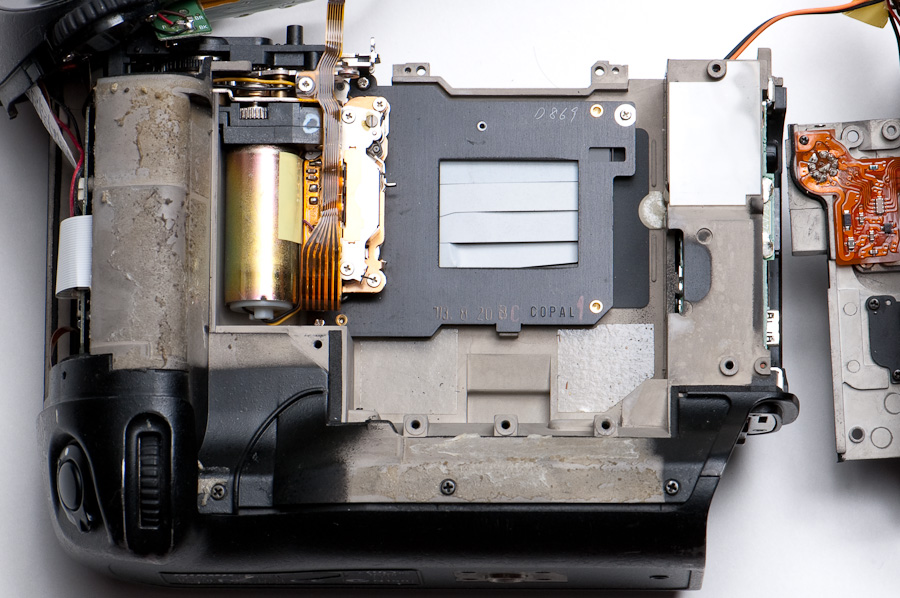
Replacing the shutter module
Without too much effort, the broken shutter module can be removed without disturbing the motor module. The shutter module is held by 4 screws – two on the top corners, and one on the lower left. A fourth screw secures the flexible PCB. This is one dirty sensor!
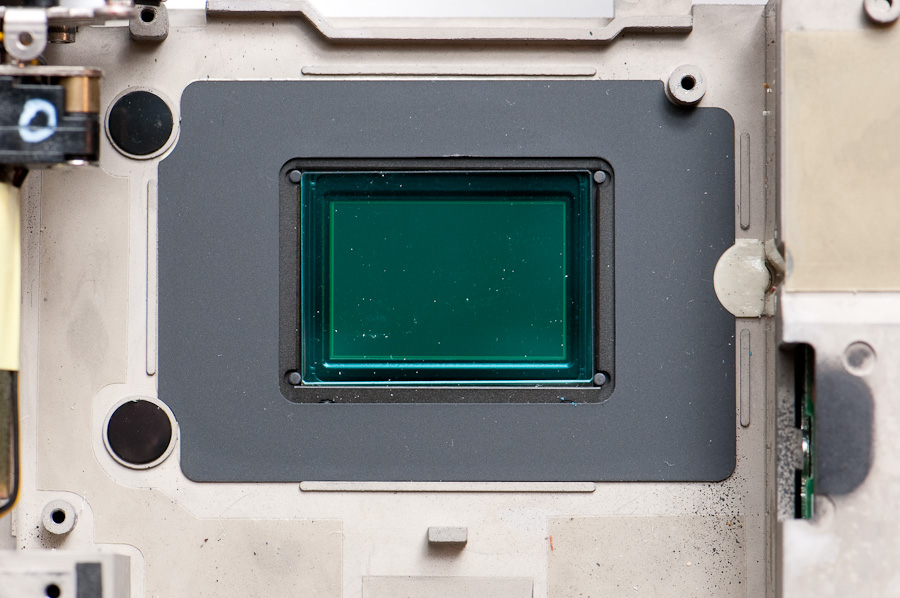
With the shutter removed, it’s amazingly easy to clean the sensor – I used a bit of 91% isopropyl (rubbing) alcohol on a Q-tip swab (dampened, not dripping wet). (91% has lower water content so it evaporates fast and streaks less.) Normally I’d heartily recommend against using Q-tips because they leave lint behind, but in this case it’s very easy to see and remove. A hard light at a side angle to the sensor makes it really easy to spot smudges and remaining dust.
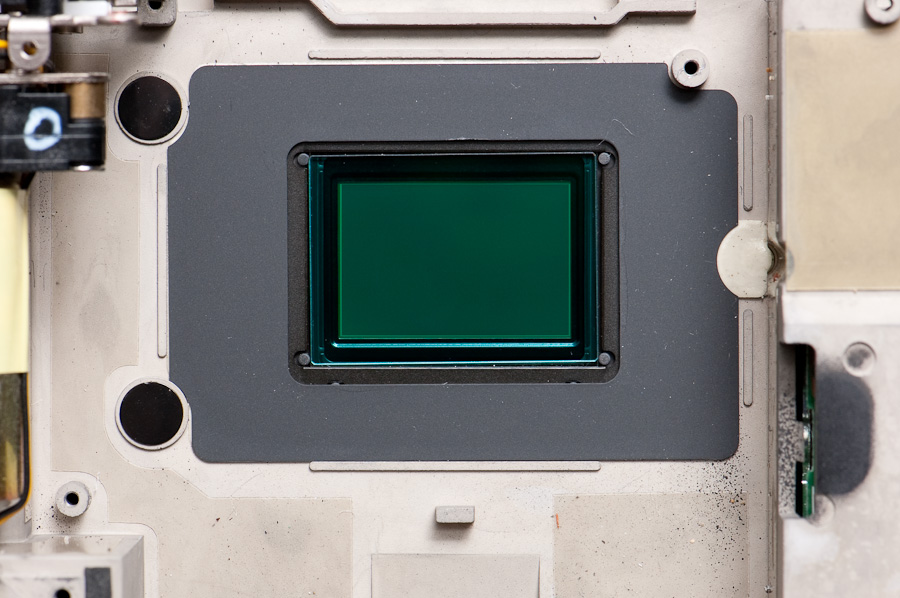
Installing the new shutter module is a snap. The upper-left screw is tucked behind the motor module, but with some patience it can be installed without removing the motor module. Although the shutter module sees more vibration than any other part of the camera, the screws don’t use thread-lock; make sure they’re good and tight.
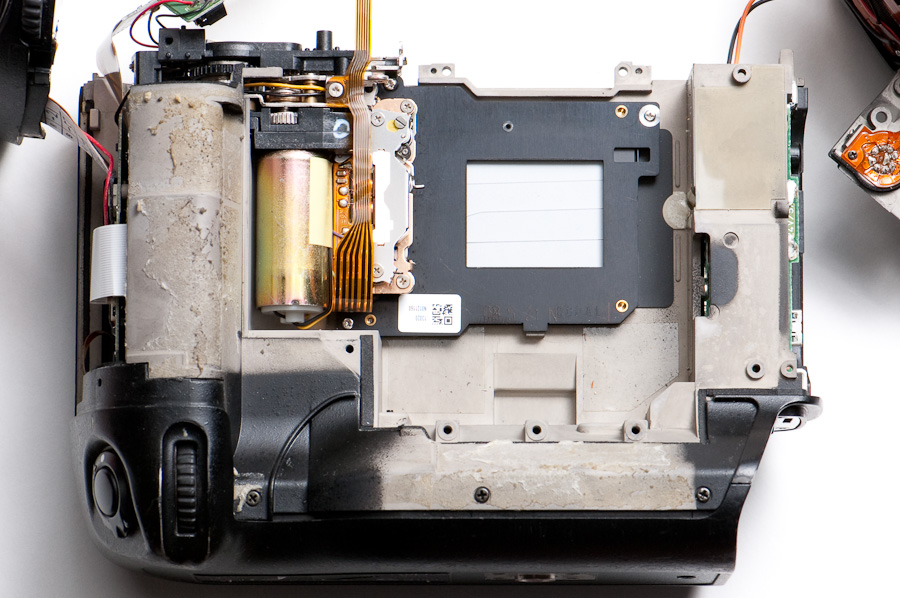
Digging into the broken shutter
There are actually two curtains in the shutter module – one for the opening of the shutter (aka “front curtain”), one for the closing of the shutter (aka “rear curtain”). The shutter leaves are made of a paper-thin metal sheet; all the shutter leaves are painted black except the lens-side of the curtain closest to the sensor – that’s the one that got damaged here. When the shutter is charged and ready to fire, the white face of the front curtain is visible. Curiously, the new shutter module was packaged pre-charged.
Here’s a rear shot of the broken shutter module – you can see one of the leaves on the curtain got pretty mangled. I was poking around the mechanism and triggered both curtains to fire, damaging the leaf even more as it tried to retract into the top part of the module – almost to the point of shearing it off. There’s a lot of force in the movement springs.
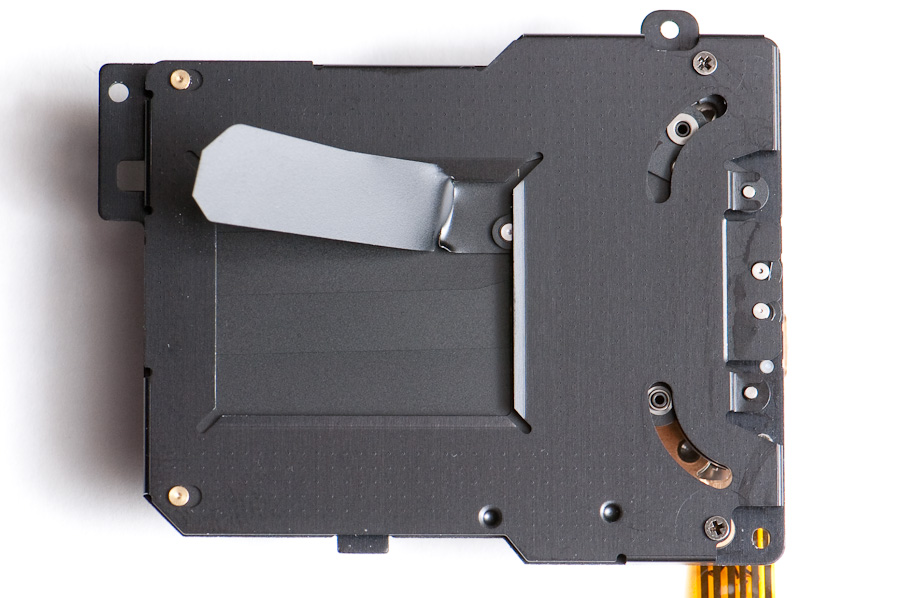
In the process, I discovered a bit about the shutter’s inner workings. On the very top side of the mechanism is a lever with a roller on it – this is a cocking (aka “charging”) lever, and pushing it to the right resets the curtain positions for the next exposure. During charging, both curtains move downward – the rear curtain stows in the bottom of the module, and the front curtain slides down right after it, keeping the light sealed out. That large motor in the grip? As I discovered below, it drives everything in the camera except the auto-focus screw.
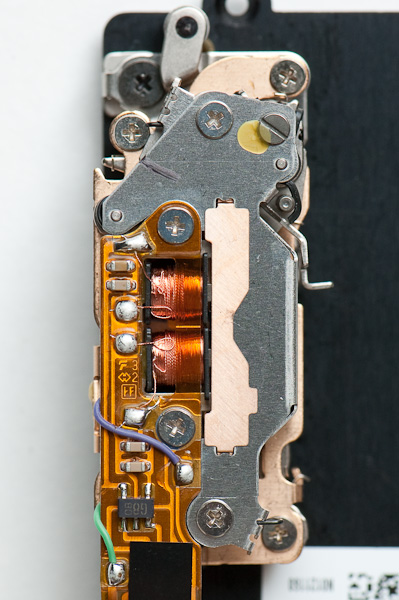
Sticking out the right side of the shutter mechanism is a release lever that’s triggered by the two magnetic coils. This one lever releases both curtains to slam upward. I discovered that the charging lever plays a role in the shutter duration – when the charging lever is at its halfway position, the release lever only fires the opening shutter (which stows in the top of the module); at its far left (relaxed) position, the release lever fires the closing shutter. So, the magnetic coils would fire twice – once for each curtain. This also dispels the idea that the camera must “hold open” the shutter for long bulb exposures – the shutter holds itself open indefinitely until the curtain release is triggered a second time. Correction: the release lever only fires once – this releases both of the curtains, but the movement of the charging lever determines when the rear curtain fires – so, it seems the shutter motor actually controls the length of each exposure. Still, there’s no effort in “holding” the shutter open during a long exposure – when the charging lever relaxes to the left, it trips an internal release lever for the rear curtain to snap closed.
Other points of interest – the purple and green wires connect to sensors that detect whether the shutter is a) charged and ready for an exposure, b) shutter open (front curtain fully open), or c) rear curtain fully closed. These are the only way the camera could know when things go awry, so it must watch for steps to fail or perhaps not complete in the expected time. Also, it appears the two coils are redundant for each other, complete with separate channels through the triggering switch chip (the black six-legged chip on the mechanism’s circuit board).
Looking at the left side view, the screw head on the right is for tensioning on the closing spring for the rear curtain – it drives the gear on top of the spring. The front curtain has a similar adjustment gear on the left, but it’s held in position with a ratcheting catch. The brass post in the center of the bottom is the contact for the purple and green sensor wires – you can see the twin fork of the purple contact just to the top left of it, and the more obvious green contact on the lower right.
On the left side of the photo is a bright L-shaped piece, pointing up near the silver screw post – this is the catch for the shutter release in its ready-to-fire state; the thin metal part touching it near the tip is the other end of the release lever. The roller at the very left of the photo is the charging lever. I’d love to pop the top off this gearbox to study the release mechanisms a bit more, but that’s a task for another day – there are some strong springs and some very fine coil wires involved in that piece of disassembly.
The curtain movements – to get a better look at the curtains themselves, I pulled the back off the shutter module and picked it apart layer by layer. As expected, there are two separate curtain assemblies. Each curtain is assembled via only one one side; the other side of the curtain floats loosely. Each curtain is sandwiched between spacers made from the same material.
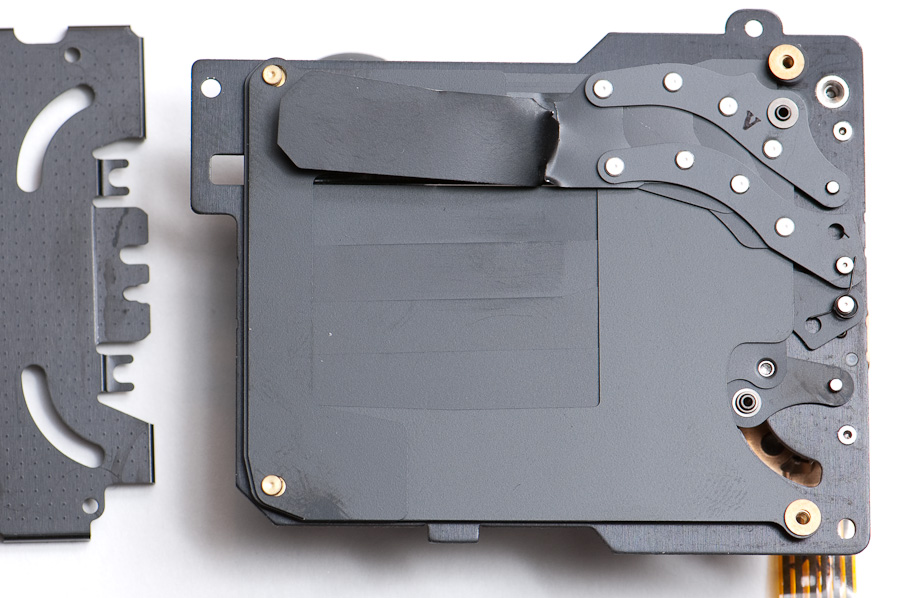
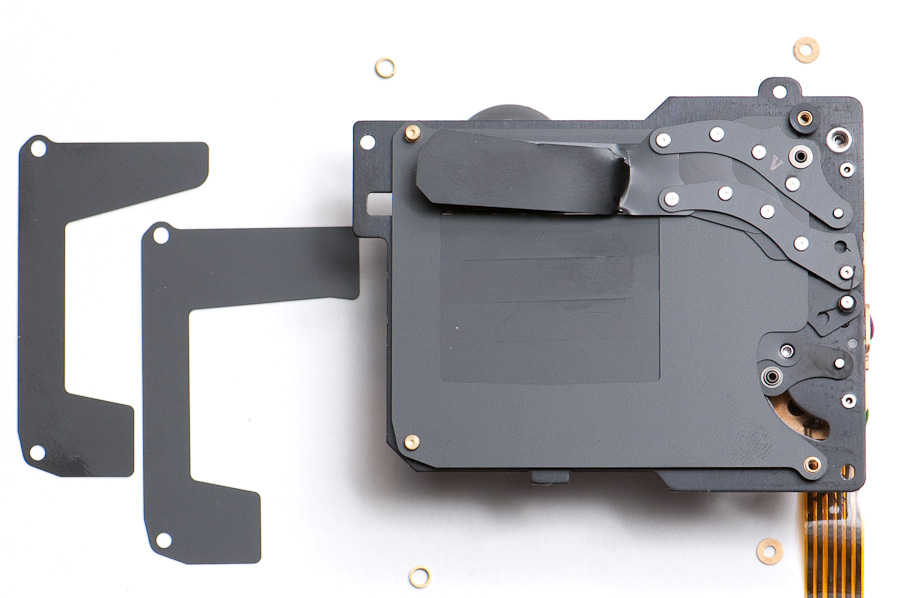
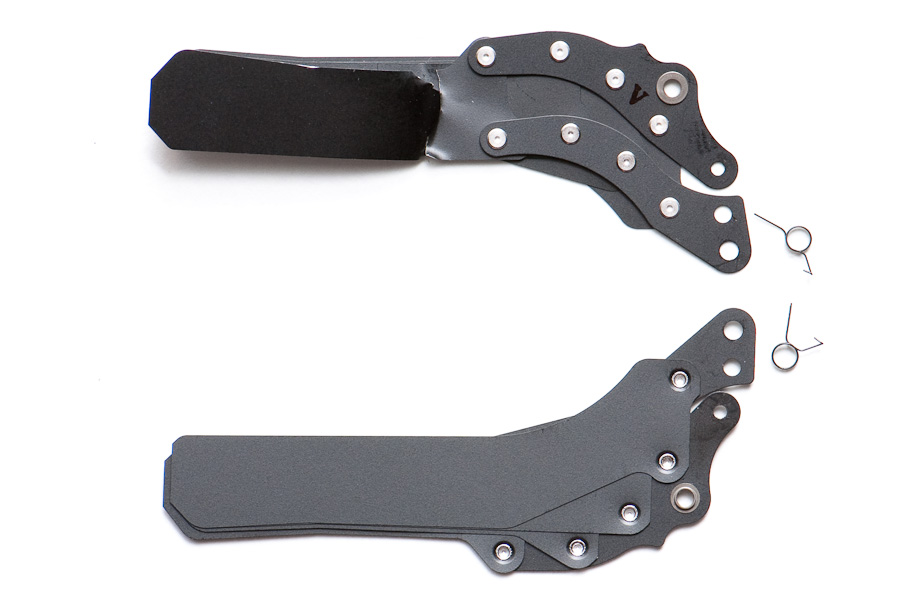
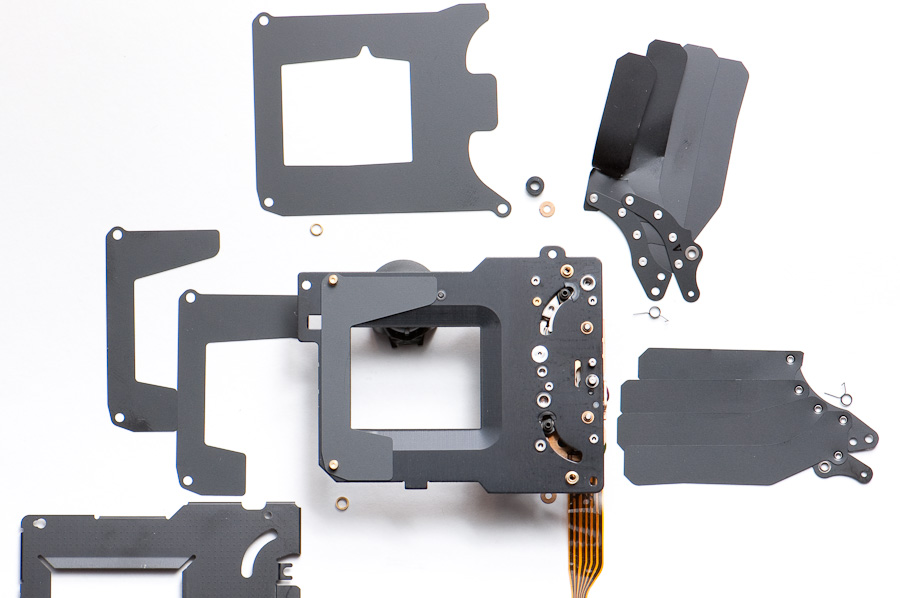
If you look closely, you’ll also spy a trade secret… Darth Vader was propping up the shutter module for these shots. Legos are an indispensable tool for tabletop photography – you can make all sorts of stands to hold parts off the background, stand them up at an angle, etc. The little round pieces are a popular choice; this time, Darth Vader’s head happened to be handy and just the right height.
Some “quiet shutter” speculation… The “quiet shutter” mode in the new D300s is likely a change in how the charging step happens. The shutter mechanism really can’t be quieted during exposure, since it needs to operate quickly; however, the re-charging step doesn’t need to be blazing fast – if a slower frame rate is acceptable, the charging step could be slowed down. This would reduce the shutter noise for half of its movement, reducing the sharper shutter noise. Similarly, the mirror movement could be slowed on the return stroke to reduce its sound.
FYI, to clarify a detail… in this shutter module the “rear curtain” happens to be the one physically closest to the lens, and the “front curtain” is physically closest to the sensor. In the descriptions above, I’m referring to the curtains by their function, not whether they’re physically front or rear in the shutter module.
Curious Bulb mode behavior – The curtain that got damaged in this case is the front curtain (the one closest to the sensor). Oddly, it got damaged while slamming closed on the cleaning tool, but it’s not the curtain that closes at the end of an exposure; I would have expected the rear curtain to be the one to get damaged. From this, I’ll conclude that the shutter behaves differently in Bulb mode (which was being used when this shutter was damaged) – instead of firing the rear shutter to complete the exposure, the camera simply re-cocks the shutter mechanism, which closes the front curtain downward. For short exposures this isn’t acceptable (because one edge of the frame would get significantly more exposure than the other), but for a bulb exposure it’s insignificant that one side of the frame might get 1/250th of a second more exposure; presumably Nikon did this because it’s a little more efficient for the camera.
The optics assembly
The guts of the camera come apart in 3 major sections – the sensor / processor / storage / display electronics in the back of the body, the shutter assembly in the center of the body, and the optics assembly in the front of the body. Like the shutter module, the optics assembly is another mechanical marvel.
The white and brown module below the eyepiece is the in-viewfinder LCD. The module at the bottom of this photo is the AF sensor. The round black part to its left is the back end of the auto-focus motor – its about half the size of the shutter motor, and it connects to a gearbox that’s flat under the bottom of the lens mount.
On the grip side of the optics module is a large spring-loaded gear that drives the aperture stop-down lever – when rotated clockwise it drives the aperture stop-down lever upwards. Adjacent to it is a bright red solenoid that drives a piston to affect the gears. Tucked away on the lower right is another solenoid – this one releases a spring-loaded mechanism to slap the mirror up. There’s one more solenoid hidden on the lower-left side.
As the discoveries unfold… on the right side of this photo is a roller lever that moves toward the front and back of the camera. It’s driven by the shutter motor, which better explains the motor’s size. The mechanism is shown here in the mirror-down state. In this state, the aperture stop-down lever is pressed upward by a medium-strength spring.
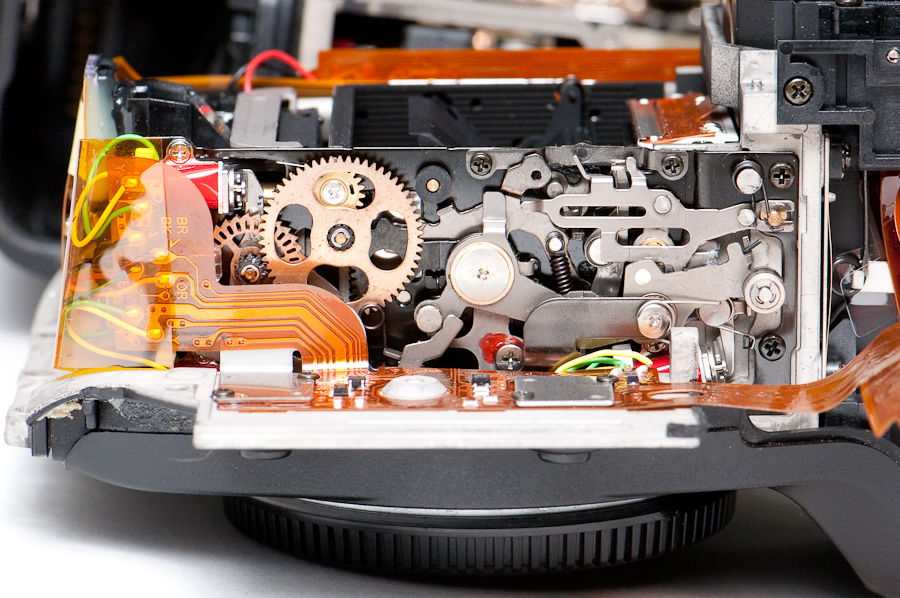
How the lens aperture is controlled… The solenoids can be tripped independently, and moving the roller lever downward (toward the camera face) resets them. Tripping the upper-left solenoid releases the aperture stop-down lever, allowing the lens to stop-down (e.g., when the DOF button is pressed). Tucked behind the large gear you’ll see a heavier, black, flat piece – that’s the “under the hood” end of the aperture stop-down lever; its left end is shaped like a slice of pie with gear teeth on it, and as the large gear turns it directly moves the lever up and down; the lever is hinged at the round silver cap to the right of the large gear.
To the lower left of the large gear is a smaller gear with index slots in its middle – as this index gear turns, the slots are counted by an encoder tucked to the left, so the camera knows how far the aperture lever has moved. I suspect (but can’t test) that the hidden solenoid on the lower left is a brake that will engage when the aperture has stopped down to the desired point. If you look closely, you’ll see this index gear has one-way ratchet teeth (not gear teeth) around its perimeter.
The auto-focus system is housed at the bottom of the optics assembly, underneath the mirror box. On the left (hidden by PCBs) is a small auto-focus motor that controls AF lenses that don’t have built-in SWM focus motors – you can see the black end of its cylinder sticking up. The motor couples into the brass gearbox at the bottom, which links to the screw drive coupler in the lens mount (see below). Behind the PCBs is also the AF sensor mechanism. The viewfinder mirror is actually a half-mirror with a rectangular cut-out in the middle; a tiny secondary mirror pops out behind it when the mirror is down – while you’re looking at the main mirror through the viewfinder, part of the image is passing through the mirror and being reflected down to this AF sensor for focusing.
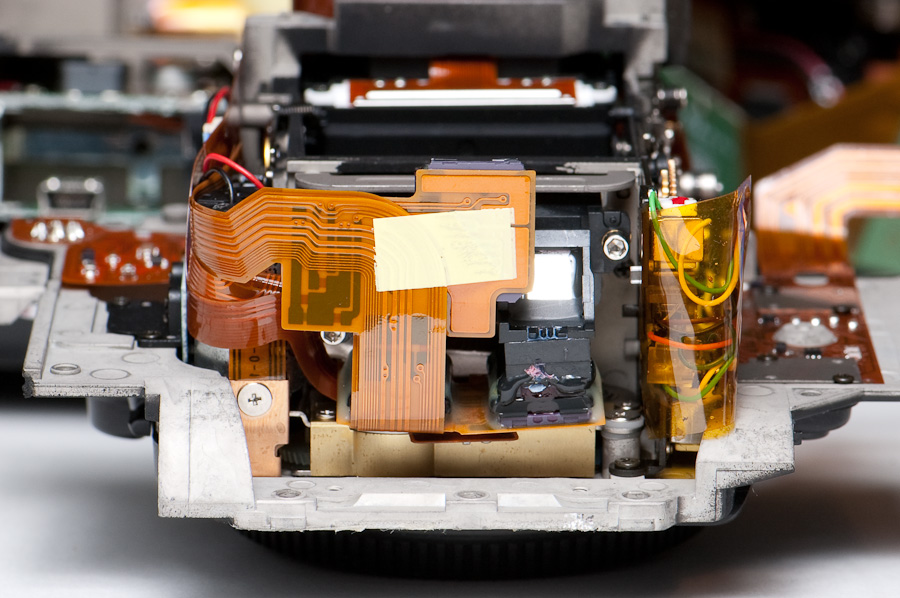
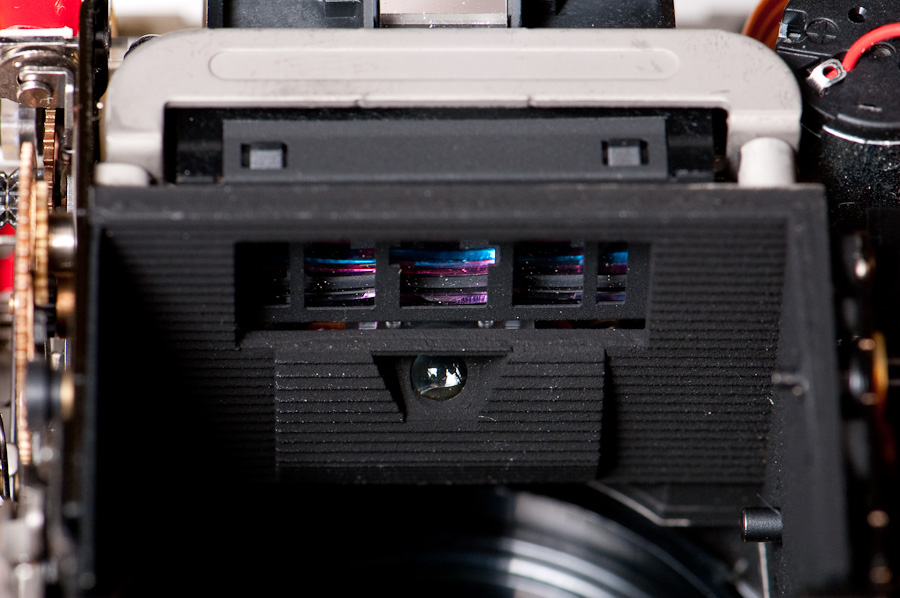
Here’s a view of the AF sensor from inside the mirror box, facing down. I’m not sure about the round lens underneath – it looks like a white (or maybe infrared) LED, but I’m not sure why it’d be there.
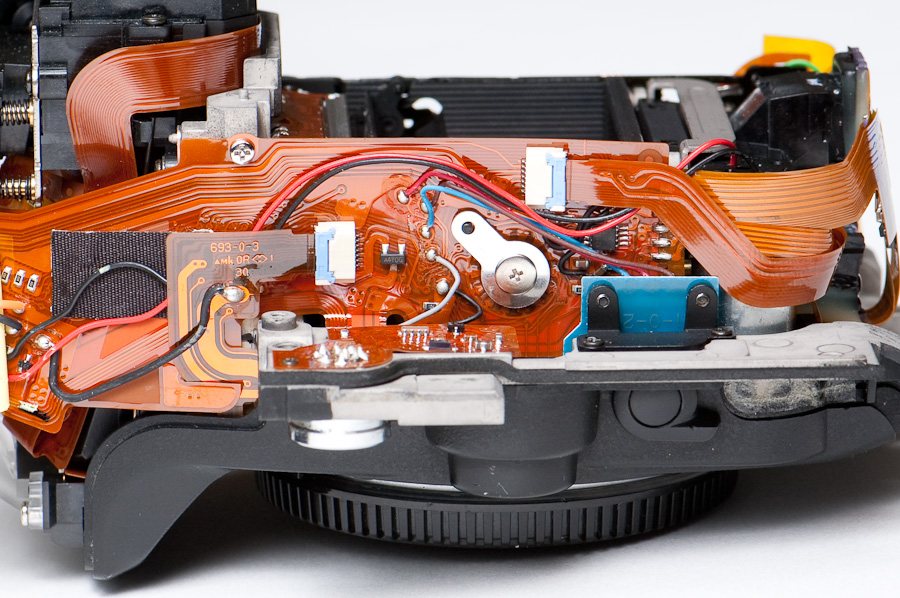
The “rewind” side of the optics assembly isn’t too exciting – mostly just circuitry.
Inside the lens mount
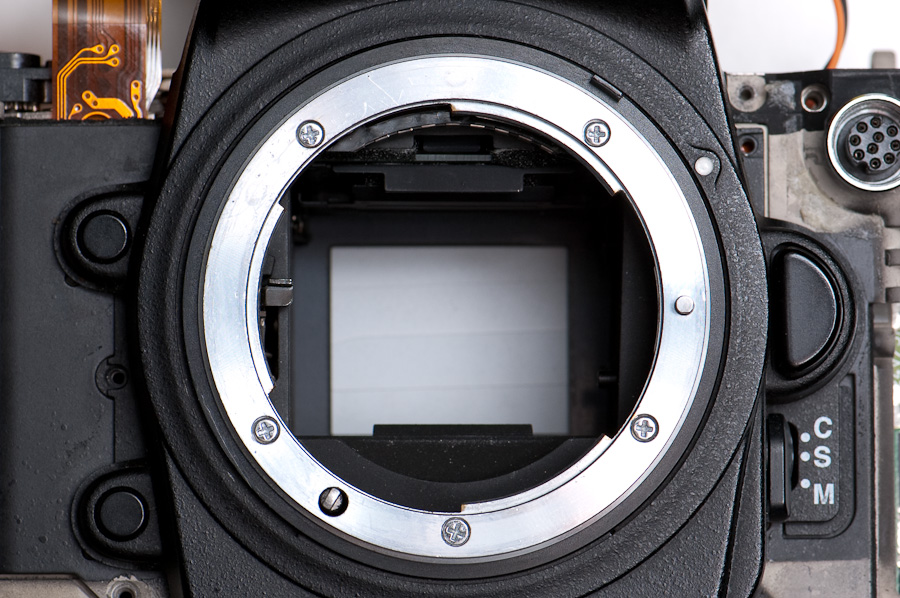
I’ve had a request to peek behind the lens mount (e.g., how the camera senses the aperture ring setting). The inner-workings detail is covered above in the optics assembly section – here, I’ll open up the lens mount and show the business end of the aperture’s mechanical coupling to the lens. Mostly this is for position reference, since this piece is the most likely to get bent during coupling and might need a “field repair”.
The lens mount is fastened with 5 visible screws. The odd piece sticking out of the lens mount on the lower-left is the auto-focus motor coupling, a.k.a. the screw drive – you’ll notice it’s spring loaded and presses flush with the lens mount during lens attachment (or for non-AF lenses). The mirror box is shown here in an unnatural state – I’ve triggered the mirror up, but the aperture stop-down lever on the left side has not been tripped. Normally, the aperture lever would be down when the mirror is up.
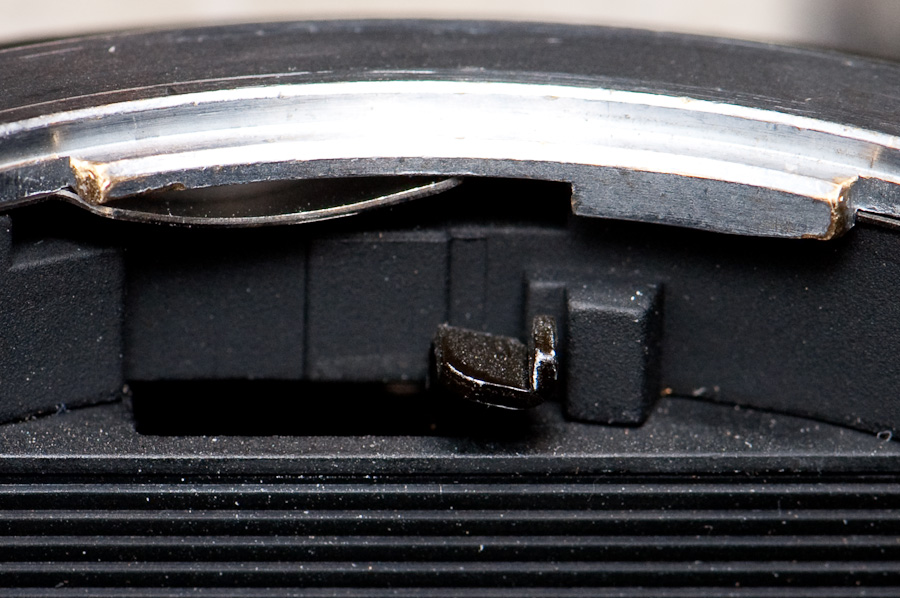
For Lenny – here are a couple close-ups of the aperture stop-down coupling lever in its normal mirror-down state. The first shot gives you an side view; the second shot is straight-on.
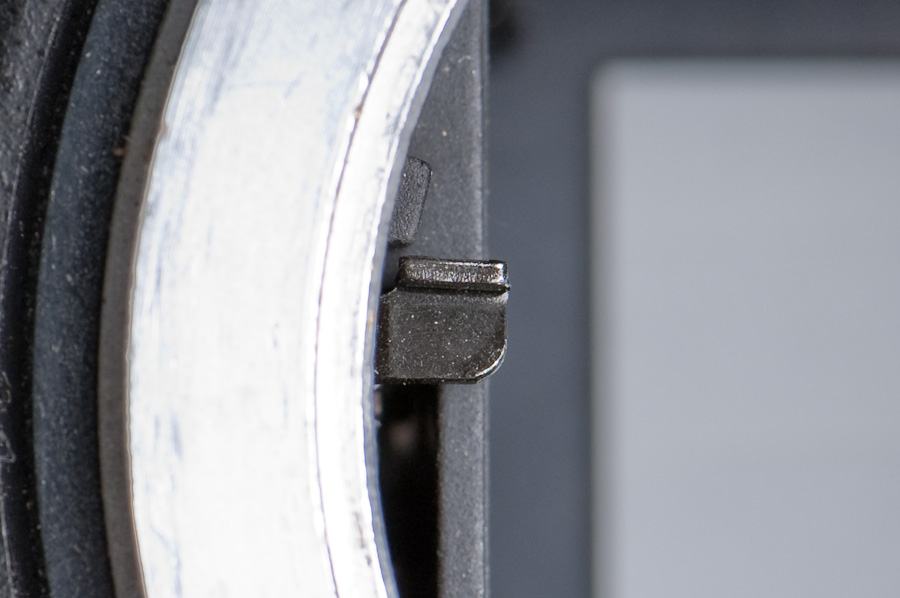
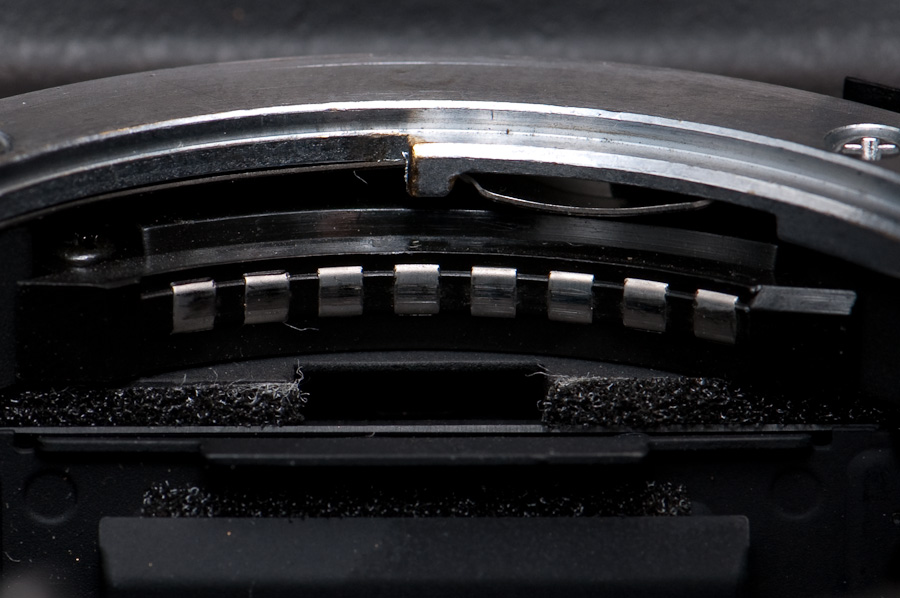
Behind the mounting plate is a spring steel ring that keeps tension on the lens when its mounted. Under the top edge of the lens mount is a series of contacts for the newer “chipped” lenses to communicate with the camera. Not all lenses have 8 ball contacts, depending on how advanced they are. Often when you get a lens error like “fEE” or if auto-focus becomes non-responsive with an AF-S lens, it’s because these contacts aren’t coupling well – they may need cleaning, but I’ve also noticed that some bodies and lenses get loose over time (especially rental lenses), and the slop or “play” in the lens mount can cause these contacts to mate poorly.
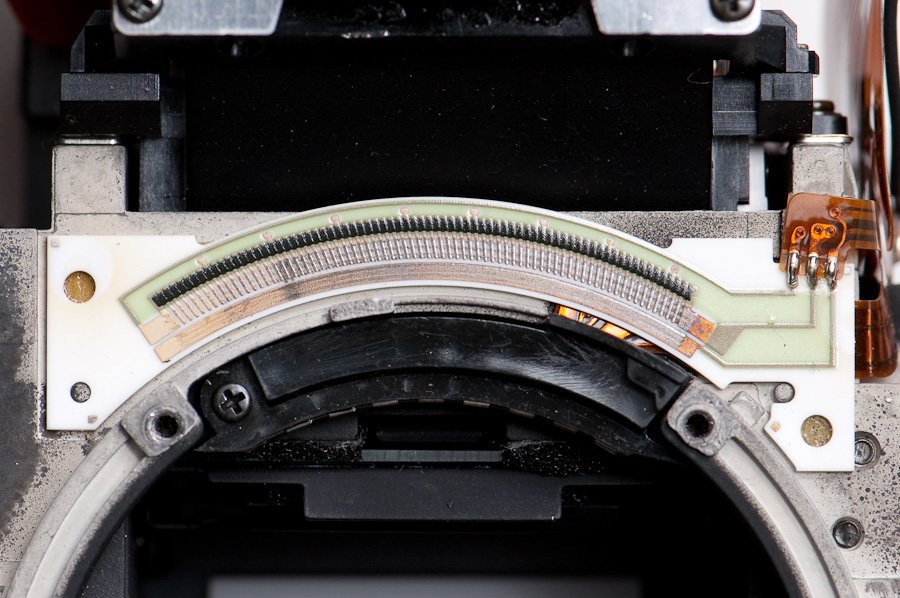
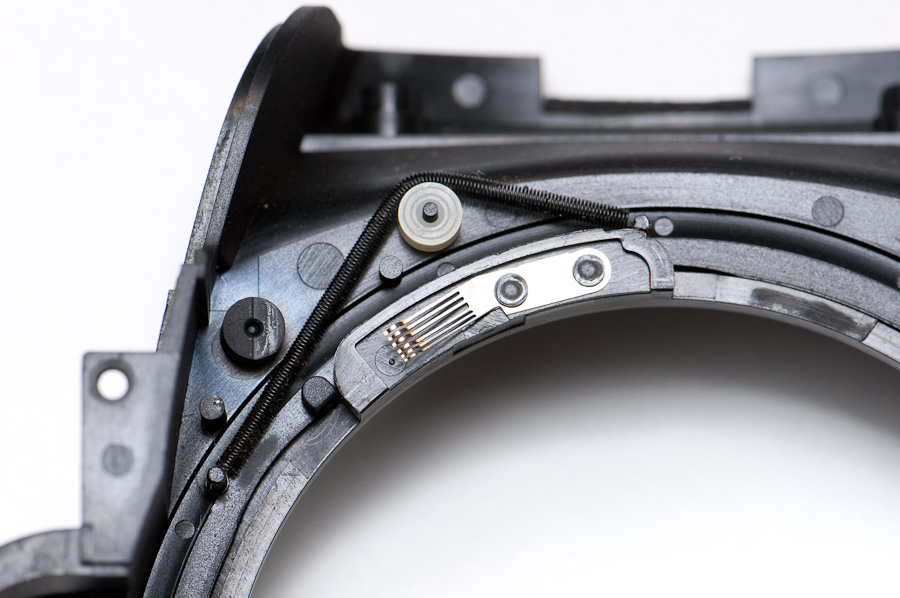
Around the outside of the lens mount is a spring-loaded aperture-sensing ring that physically engages the aperture ring on non-G lenses, so the camera can detect the manual aperture setting. It’s connected to to the faceplate, which is fastened with four screws – two on the bottom and one one each side of the lens mount. The CSM selector switch has a cover button taped in like the diopter adjustment knob – pop it out to unscrew the selector switch so the faceplate can be removed.

There’s not much behind the front faceplate except the wiper contacts for the aperture-sense ring; it appears to be a resistor strip. On the backside of the faceplate you can see the spring and the wiper. Depending on the amount of electrical resistance, the body can detect the position of the aperture ring on a manual lens.
Re-assembling the D2H
The moment of truth – will it still work after I’ve been fiddling under the hood? Fortunately, I’ve got a lot of photos or it’d be like trying to put Humpty Dumpty back together again.
Reassembling the camera is a little more than reversing the process, and the photos were really useful reference. If you didn’t label the screws really well, you’ll be scratching your head. The photos quickly answer questions like “Just how far is this cable supposed to be pushed into the connector?” and “Does this cable go over or under this circuit board?”
Naturally, I didn’t wait to get all the screws back in before I had to get a battery and test it. I slid the battery in, and the top LCD came alive. I held my breath, turned it on, and… (drumroll)
“Err”
I was crushed. The D2H was still a paperweight. The project had been interesting, but I’d blown $100 on the new shutter and I didn’t get a working camera. I squeezed the shutter button for the heck of it. “Click.” Nothing new – it’d done that before I started work. Then I noticed…
“bulb F0”
Hmmm. No more “Err” on the LCD! Click. Click. Yep, it’s alive! Apparently the “Err” is a remembered condition that doesn’t clear until a good shutter cycle. Set it to 1/125 and CH. Listen to it purr off rapid fire!
Restoring the rubber grips
Apparently it’s normal practice to install new grips when a repair shop does work inside a Nikon body. In the D2H’s case, that adds at least USD$75 in materials to the project. In the interest of keeping this project low-budget, I was careful when removing the grips and I’ll be cleaning them and re-installing them.
I did check into whether Nikon sells the die-cut adhesive strips, but they don’t – those only come with a new grip. I had thought to use a gel adhesive (Welder Adhesive by Homax – it’s like a strong rubber cement), but my local repair shop recommended DuoBond, which is apparently available at hardware stores. Someone else suggested using a high-strength 3M double-sided tape, which I might like better than a gel; 3M makes some pretty strong stuff, especially if you buy the automotive versions. Whatever you do, don’t use a hard adhesive like cyanoacrylate (super glue) or epoxy with rubber – it won’t stay stuck to the rubber, but it’ll never come off the hard body material.
Now, I do need to buy one piece of grip – the one on the CompactFlash door. It’s a popular part to lose, but the trouble is you can’t buy it! Once upon a time it was available for about USD$4, but Nikon no longer offers it separately – you have to buy the whole door for USD$43 with the grip on it. Yeah, the NikonUSA Parts Department agree that this stinks – it’s the only way Nikon Japan provides it to them.
Getting the goo off – I’m sure there are chemical strippers, but good old-fashioned elbow grease works pretty effectively without damaging the body. Using something hard but not sharp (say, a fingernail), scrape the adhesive starting at its edge – it’s basically a thin paper tape with two-sided adhesive, and it’ll come off in sections if you’re patient. Sticky residue can be removed using a Q-tip dampened (not dripping wet) with 91% isopropyl alcohol; the 91% version is more potent, but doesn’t seem to affect the body at all. The alcohol won’t work to remove the tape itself, just the residue left behind.
Cleaning adhesive off the grips is another matter, and I can see why repair techs just replace them instead – the adhesive sticks much better to the rubber. For this, I’m trying a heavier application of alcohol, along with a metal blade as a scraper (holding it 90° to the surface so it only scrapes, and doesn’t cut). Don’t use more aggressive paint thinners because they could attack the rubber grip, causing it to deform.
This is the section I’m currently working on.
[Cleaning the adhesive off the grips]
[Gluing materials, technique, etc.]
[Order parts from Nikon – how long to arrive?]
[Cleaners / reconditioning]
Replacing a cracked LCD cover
The rear panel has a secondary small LCD, whose cover was broken when I got this camera. A replacement is only $6 and includes the plastic plate and the die-cut adhesive tape.
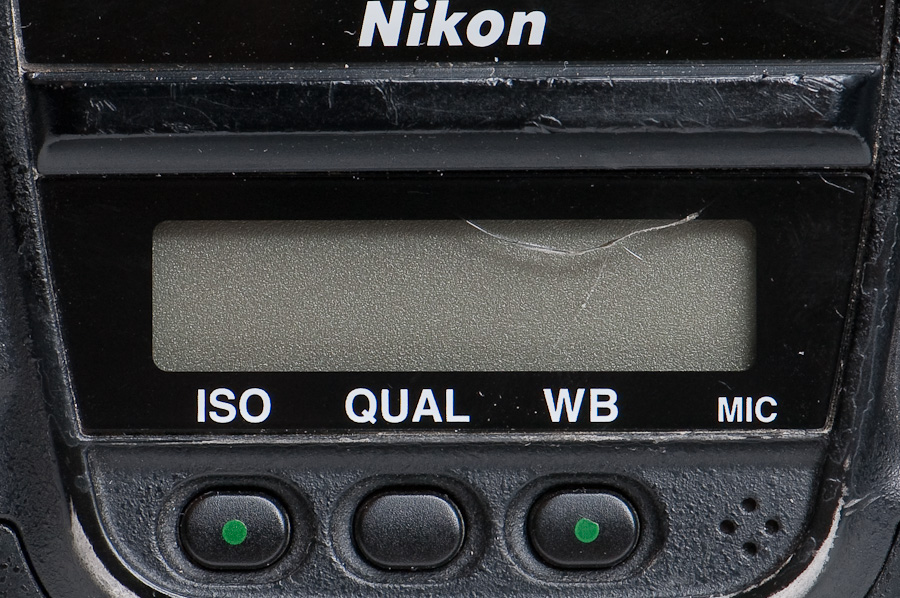
The LCD cover is attached using a die-cut adhesive tape, so the cover can be peeled off like the grips. I’ll use a dull pocket knife because I want something fairly sharp but sturdy enough to pry with.
[Insert photo of the LCD cover removed]
[Insert photo of the replacement LCD cover]
Refinishing the brassing
“Brassing” is the term used to describe where paint has been worn down to the metal due to heavy use, usually polishing the underlying metal in the process. (In this case, the body is a composite [plastic?] material rather than metal, so the wear reveals a dull grey material underneath.) Some folks like to see paint restored to new condition; other folks value the genuine wear, since it’s just cosmetic.
I debated stripping the paint and giving this camera a cosmetic facelift, maybe with a gaudy “international orange” paint job. In the end, I decided simpler is better – several buttons have silkscreened icons that would have been beyond my skills to replicate. In the end, I think I’ll leave the paint as-is – I dabbled with a permanent-marker re-touching technique, but it doesn’t hold up. In the end, it’s a tool, not a showpiece.
Cleaning techniques
[Stippling method with toothbrush; cleaning materials]
Resources
- Nikon D2H Parts List (D2H = VBA10301)
- Nikon D2H Repair Manual sources
- Nikon D2X Parts List (D2X = VBA10501)
- Nikon D1 Parts List
- A few other Nikon service manuals
- Nikon Parts Department
Finding the Nikon parts list diagrams
It took a lot of scouring to find the first one, but now I’ve got a method that’s easier – here’s how:
- Do a Google search for the common part name – e.g., Nikon D2H “parts list” (with the quotes). This will find tons of hits, including several from repair manual shops that want to sell you PDFs.
- In the descriptions that come up (or the sample cover pages), find the Nikon internal part number for the product (e.g., the D2H is VBA10301)
- Search again for the part number – e.g., Nikon +VBA10301 “parts list” – the quotes tell Google to find those words next to each other, and the plus sign makes the part number a mandatory match (Google won’t return any results without that word). This will find a small number of hits, hopefully including a free source.
- The “parts list” contains the exploded diagrams like I’ve linked here. Nikon also publishes a “repair manual” for each product.
Any requests?
While I’ve got this camera opened up, let me know if there’s something you’d like to see that I haven’t torn into. Once the grips go back on, they’re staying on!
Was this valuable info?
If this article just saved you a few hundred bucks, I’ll shamelessly ask you to throw a donation in my direction.
Legal stuff
Yep, this content probably has errors and omissions – there are no warranties. This is an “over-the-shoulder” look at my work and opinions, and is neither a how-to guide nor or a recommendation that you undertake a similar project. I wish you well, but if you attempt this project it’s at your own risk.
©2009 Richard Hornbaker. All rights reserved.
http://richard.hornbaker.org

.
.
 Bit Twiddler's Rant
13 October 2009 at 13:13
nicely done Richard! wishing you the best on your endeavor!
19 October 2009 at 14:18
nice progress Richard. your very methodical, detailed and well documented approach is awesome!
19 October 2009 at 22:42
Thanks! Capturing all the detail slows things a lot, but it’s as much a future reference for myself as anything else.
Schedule permitting, I’ll poke around the optics assembly in the next few days, and hopefully get it reassembled for testing before taking a hiatus. Fingers crossed that it works when I’m done! 🙂
19 October 2009 at 23:38
Your welcome. If it looks like you are going to get into a real challenging situation with the optics assembly (or lack the time) then please don’t take any risks on my behalf.
I was mostly hoping to see if the aperture ring system surrounding the lens mount looked fragile behind the ring and what made up its basic components.
And I am interested in seeing some pics of the minimum aperture post system components that is inside the lens mount opening at about 9 o’clock of the D2H camera body and whether it is fragile or not.
This all relates to my recent D2H fEE error when mounting AF lenses with an aperture ring (G type lens w/ neutered aperture ring worked fine). I made the mistake of mounting some older non-AIS lenses and I believe this caused the fEE error to appear. All the typical fix it solutions didn’t work (cleaning electrical contacts, setting aperture ring to the minimum aperture and locking, etc.)
I was able to fix the fEE error by bending the aperture ring tab upright again (it was bent slightly outward), and then rotating the ring back and forth rapidly for 30 seconds to make sure it was free of crud and operating smoothly.
I then returned the minimum aperture post (9 o’clock) to its original location by bending it ever so slightly up with a screwdriver. Then I cycled the minimum aperture post back and forth rapidly for 30 seconds to make sure it was free of crud and operating smoothly. I did notice that the flat black paint on the top and corner of the lever toward the middle of the lens opening had been worn off I assume from mounting certain non-AIS lenses.
Then all my AF lens with aperture ring tested on the D2H without the fEE error. YEAH!!! And needless to say I won’t be mounting any unconverted non-AIS lens on my D2H ever again! 8^)
22 October 2009 at 21:30
unbelievable… I would prolly just spend the extra 250 and have Nikon do it, but you are one hell of a tech! Good job!
18 November 2009 at 13:19
Richard, I use Reynolds Lighter Fluid to get gummy labels, etc., off of stuff all the time. It is very gentle and not hot like goop is, but evaporates much slower than isopropyl so it is easier to work with. Do you think that lighter fluid would work taking the gummy gunk off the grips without making them swell?
18 November 2009 at 15:55
Good call – I’ll give lighter fluid a try; alcohol cleans up the body fairly well after scraping off most of the goop, but not so good on the rubber grips. I think the trick is for the solvent to be just strong enough, but not too strong. (e.g., Lacquer thinner would surely do the trick, but the grips would never be the same.)
My back-order of parts from Nikon just showed up yesterday, so it’s time to take this project off the shelf and finish the job!
20 November 2009 at 13:25
I thought you might find this interesting… its on lenses but it still might have application.
The real concern I would have is whether the lighter fluid causes the grip / skin to soften and swell or not.
I know that mosquito repellent was very hard on my D50 grips even when I tried to thoroughly wipe it all off my hands before touching my camera. It smoothed out the crinkly surface and caused some swelling where my right thumb rested over 3 summers of use outdoors in mosquito country.
http://www.kyphoto.com/classics/forum/messages/13061/10165.html
“The best solvent to use, especially in newer lenses with plastic barrels etc, is cigarette lighter fluid. It has the (not totally unique, but very valuable) property of being safe to use around polycarbonate. There are more effective cleaners but they are not all safe with plastics, and lighter fluid is capable of doing a good job of cleaning up the oil.”
13 October 2011 at 15:48
The nikon grips stretch like that, its not the cleaner (or certainly not the lighter fluid). Apparently the petroleum in the rubber starts to come out and make’s it hard for adhesive to stick also.
28 November 2009 at 15:58
I think the sensors and thing like an LED in the bottom of the mirror box are photodiode TTL flash sensors. The TTL flash sensor is 5-segment on the D2.
17 December 2009 at 11:36
Great post. I’ve replaced the shutter and with great care, everything has found its place and the camera seems fine.
With one exception… the shutter fires and sounds right, but the err message comes up. On the next shot, the shutter sounds only like it’s closing (like after a time exposure), and err is gone. Both frames are black. Every two shots repeat that pattern.
It seems that the curtains are out of sync. Could this be an issue of the charging lever being in the wrong position? Should the shutter be charged or rested when it’s put into place? Or, is there another setting to consider?
14 January 2010 at 13:06
Hi, Patrick. Sorry, I overlooked your question – did you find a solution?
In the shutter is a pair of contacts with a pair of wires leading to them. One detects when the first shutter opens; the other detects when the second shutter closes. I suspect since the camera “knows” how long the exposure should take, if those sensor contacts trigger too slowly then the camera knows the shutter isn’t operating properly and it triggers the “Err” message.
On the surface, what you describe sounds like a sticky second curtain, but since this is a new shutter that seems unlikely. The other possibility is that the main motor used to charge the lever is having problems, perhaps only when it’s rotated to certain positions (which is why it wouldn’t happen all the time). Since the motor seems to control when the second curtain releases, that would cause a similar effect. In tht case, the trouble could be with either the motor or its controlling circuitry.
Some thoughts…
With the shutter out of the camera (or perhaps with the old shutter), check to see if it’s functioning properly when you work it manually. You can push the charging lever on the top by hand, and release the solenoid lever with your finger. Depending on the position you hold the charging lever in, you’ll notice the second curtain doesn’t fire. If the shutter itself is as sticky as you describe, you should visibly notice the shutter working slowly when you release the solenoid. If the shutter’s really that sticky, maybe a cleaning will handle it; if the shutter works fine, the problem may be related to the motor.
17 December 2009 at 14:46
Excellent tutorial. Quite a masterpiece for those inclined to open up their expensive toys.
21 December 2009 at 00:51
I bumped into a Fuji S2 Pro camera body today that needs a shutter replacement for $75. Just thought I would mention it in case you were interested in buying it. 8^)
18 January 2010 at 20:03
H!
In your online study of the Nikon D2H, have your found any reference to replacing the 4.1 meg sensor with one of the newer D2 series sensors?
Rod
19 January 2010 at 06:21
Hi, Rod.
Replacing the sensor really isn’t an option, unless you’re scavenging 2 broken bodies to built a working unit. The sensor PCB module is well over USD$1000 from Nikon, and you can’t buy any of its parts separately (not even the low-pass filter). It’s cheaper to buy a low-mileage used D2X than try to upgrade a D2H body.
02 February 2010 at 03:07
Richard, i have a question. In the mirror compartment there is a screw before the first (large) mirror. I you look at the camera, its is on the right-bottom side (just before the mirror. Its a hex screw. Do you know, is that the screw that controls the mirror angle? The mirrors (both the main one and the AF mirror) sit on little stilts that stick out of the right side of the mirror compartment.
03 February 2010 at 10:04
Hi, Tim. Let me take a look and see what I find.
10 February 2010 at 15:45
Hey, just to let you know (and potential readers) i bit the bullet and tried it. I had front focus on this camera, so it was useful only for wide shots. I tinkered around with the mentioned screw, and got it to focus perfect on both the 70-200 and 105 F2 DC. Its not very delicate either, it took 3 full rotations of the screw CCW to get it perfect.
I know its off topic, but your blog post is the closest i could get online to DIY D2h repair. Hope this helps someone.
09 March 2010 at 19:37
Hey,
I’m curious if the D2h and the D2x have the same shutter? any idea on getting a parts diagram for a D2x to compare part numbers?
Thanks,
-Cody
09 March 2010 at 20:19
Hi, Cody. According to the parts lists they are slightly different part numbers (D2H = 1B060-812; D2X = 1B060-906), but the suffix is probably a revision number and I’d bet if you called Nikon parts they’d sell you the same part number for both. It’s smart to have the part number when calling, but they can look it up and if there’s been an update they’ll sell you the substitute part anyway.
FYI, I followed the search tips above to find the D2X parts list here: http://thefotogeeks.com/diagrams/nikon_digital/DSeries/D2X_Parts.pdf
11 March 2010 at 19:33
Thank you very much, I also found a seller on eBay with both D2h and D2x Shutter units listed separately, but referencing the same part number (1B060-906). Seems as though they share the same shutter.
Thanks for the help!
12 March 2010 at 17:11
I saw your post about the Fuji Finepix S2 with the bad shutter.
A few years ago I picked one off of eBay with a bad shutter (shows ERR) $56 dollars. Then I found a Nikon N80 film camera. The N80 looked fairly new, so I took a gamble for $27 dollars. It took an entire day to transplant the shutter. My S2 still keeps on clicking to this very day. I probably should have checked the price for a new shutter assembly, but the repair shops in my area are pretty tight lipped about sharing information.
24 May 2010 at 19:39
Any idea what you would do if you stripped one of the screws on the back side of the camera that hold the optics assembly on…?
05 July 2010 at 22:25
Hi, Cody.
Sorry, you’ve probably long since answered your question…
If you’ve stripped out the head of the screw, a few options spring to mind:
1) Use a Dremel tool with a cutoff wheel to notch a tiny slot in the screw head that you can use a flat-head screwdriver on.
2) Use a hard adhesive like epoxy (just a tiny bit!) to fasten something (another screw?) to the screw head, so you can grab it and turn to remove the stuck screw.
3) Very carefully grind or drill out the head of the screw. Remove just enough material to get the part off, then you can grab the screw stub with pliers and unscrew it for replacement. Using a larger drill bit will remove more of the head and less of the stem. Practice elsewhere before doing this to your camera. 😉
If you’ve stripped out the hole, that’s a different problem, usually involving a slightly larger screw and a tap & die set to cut new larger threads in the hole. An alternative might be to fill and re-thread the hole. Either option is pretty advanced and unlikely for most folks (me included) at this fine scale.
01 July 2010 at 09:47
Howdy!
First off, great job!
Second off…I’d like to actually know more about how the camera performs! I’m looking into getting a body from someone I know at a really great price, but haven’t been able to find information on how the camera performs against newer cameras. I mean, obviously the new cameras will be better overall, but i’m on a budget, and would really like to get a photography career rolling along! I’m interested in finding out if it’s worth getting over, say, a D60 or something along those lines! I can get the D2H body for USD$400 and have a few compatible lenses for it! Thanks!
~Matt
05 July 2010 at 21:46
Hi, Matt.
Thanks! You’re asking for a tough comparison…
The D2h is an old camera – arguably, several generations old. Its 4MP sensor is low resolution by today’s standards, it’ll be much noisier at higher ISOs, and the in-camera software is not as feature-rich. However, it is a pro-grade camera, very rugged construction, integrated vertical grip, has a built-in microphone for notes, and at 8fps it absolutely screams! It also uses CompactFlash cards, so if you plan to buy a D300 or higher in the future those will be reusable. The battery system is the same as newer pro-grade Nikons, and can also be shared with a D300 to run it at 8fps, which otherwise would cost ~$300 to do. FWIW, I recently did a multi-camera shoot of a hot-air balloon launch using this D2h and a D300, and I was consistently more impressed by the colors coming out of the D2h by default.
$400 is a decent price for a D2h with batteries and a charger if the shutter’s low-mileage. I can’t see its price coming down too much further, so another benefit is that you’d likely be able to sell it for the price you paid when you’re ready to move up – you can’t say that about any new camera. Do watch out, though, for the number of shutter actuations. The D2h is a workhorse, and you’re probably going to end up with a high-mileage unit. While the shutter seems to fail most often, there are a lot of other moving parts to wear.
And a small nit… if you plan to go pro, entry into Nikon’s NPS club requires 2 pro bodies, and the D2h counts as one. If you can meet the other criteria, there are some handy benefits. Hope this helps!
05 July 2010 at 22:03
A couple more thoughts, more feature-specific…
The D60 has a built-in flash; the D2h does not (nor do the other top-end pro bodies). Honestly, pop-up flashes are bad practice anyway – they’re under-powered and cause red-eye (too close to the lens). Their redeeming value is as a master in Commander mode with Nikon’s CLS flashes as slaves, but the D60 probably doesn’t support Commander mode anyway. I use an SB-800 anytime I need an on-camera flash, even on cameras with pop-ups.
And… the D2h has a screw-drive focus motor, so it can use the entire Nikon line of AF lenses, including some cheap but optically excellent ones; I recall the D60 does not have a focus motor in the body, and requires newer AF-S lenses with built-in. A great example is the $100 50mm/1.8 AF, which the D60 can’t auto-focus; the D60 requires the $450 50mm/1.4 AF-S version – and folks will argue (and I agree) that the f/1.8 is optically on-par or better. Look also at whether the D60 can meter properly with older manual-focus lenses – that’s probably another differentiator.
I’d point you to the camera reviews / feature lists for the D2h and D60 on dpreview.com for a more complete rundown of the features.
Cheers,
Richard
05 July 2010 at 22:47
H!
I used the D2H for weekly newspaper work for a nine month period after using the D200 for a year. Now using the D90.
D2H handles better, faster, loved it. It is better than both. Still is.
I used the D2H side by side with the D90 on one event this last January. Handling of the 90 is crap, but the larger sensor produced far superior images.
D2H would be a great camera for someone doing just web work and shooting lower ISO.
Anyone scrapping a D2X so I can get the sensor for my DH2?
05 July 2010 at 23:07
I used mine up until 2010 for web ads. Didn’t really miss the extra resolution for this kind of work, only the ISO. I did eventually update to the D3s.
Im selling the D2h now.
13 October 2010 at 09:08
Hi. I have a scap D2h which needs a new shutter (at least) Anyone want to take it off my hands for a few quid?
06 November 2010 at 17:21
Hi Richard,
Great write up. I am going through a shutter replacement on my D2X right now, I just have 1 question:
When you remove the lens /lens cap and lift the mirror with your finger, what colour of the sutter curtain do you see ? White or black ?
thank you !
peter
06 November 2010 at 20:49
Hi, Peter.
When the shutter is charged and ready to fire, the curtain facing the lens is white. Normally, this is the only mode you’d ever see, because the shutter is always charged to fire. (I’m not sure there’s a need for it to be white, so other versions may exist. Both my original and the replacement were identical.)
FYI, there is a second curtain in the shutter module, and when it’s closed the shutter appears black facing the lens. This curtain is normally only visible for a fraction of a second at the end of an exposure, until the main motor recycles the mirror and charges the shutter for the next shot. Both curtains are black facing the sensor.
Please do let me know how the project went!
HTH,
Richard
06 November 2010 at 21:04
Also…
I’m curious – why do you ask?
And… be careful handling the new shutter module from Nikon. For some odd reason, Nikon ships the new shutter charged and ready to fire. On the shutter mechanical mechanism, there is a silver arm sticking out the side closest to the shutter curtain – if you touch this the shutter will fire, and if your fingers are in the wrong place you could damage the new shutter. (You’ll see a roller on top – this will re-charge the shutter if you push it to the left.)
Also, the shutter curtain and frame pick up finger oil instantly, so wear cotton gloves if you’ve got them. (Grainger sells thin cotton inspection gloves for cheap.)
07 November 2010 at 06:51
Richard, Thank You for a quick reply !
I was worried my shutter is dead but it looks like internal AF metering system must be the fault.
I get the “err AF” message and I thought it might be the shutter + something else however the shutter fires fine, It gives that error when the lens is removed and when the AF switch is in M position for manual focus :S
I believe all my previous Nikon DSLR’s had the black curtains facing the lens at all times so I began to believe that the error message has something to do with Shutter not closing properly.
29 November 2010 at 19:37
Oh, Richard! Thank you very much for the great post. I use to change my rubber grips often on my D2x at the local Nikon service cause they all get detached once a year no matter what. Unfortunately, Nikon likes to keep me waiting at least 2 months for the job and rips me off some serious cash. I bought my D2x in 2005 and we’re still in love and married since… Could you please point me the right 3M double tape? Canon grips are much more reliable imho. A buddy of mine suggested I should either always use gloves against hand grease when working, or made myself wooden custom grips, like Alpas have 😉 Cheers!
05 January 2011 at 10:18
Hi, Badea. I have not yet re-applied my grips, so I don’t have any better pointers for you. What I can say… if I end up using tape instead of glue, I will be looking for it at an automotive paint store. In my experience, the adhesive tapes made for vehicle trim are very long-lasting.
05 January 2011 at 17:40
Thanks. I’ll look forward for new posts. Your endeavor is great. Keep in touch 😉
23 January 2011 at 04:44
Hi Richard,
Wow – I was just looking for information on how to find out the number of clicks the shutter has had on my D2x, and came across your post. I wouldn’t normally be interested in even considering a DIY shutter replacement, but I did enjoy reading through the whole post, and now know that the number of shutter clicks isn’t stored in the actual shutter, so thank you for that! (and as you say, very good to know if you’re buying a second-hand D2x and the seller claims to have had the shutter replaced!)
My question is… how can I find out how many clicks the shutter has actually had?
Thanks for a great post, and regards from a very rainy day in Spain!
24 January 2011 at 18:24
Hi, Sharon. Thanks for the kind words!
If you are looking for the shutter count, use a tool like ExifTool to look at the “maker notes” in the EXIF data of a file right out of the camera. There is a field called “ShutterCount” that contains the number of clicks since last reset. Many tools will show the “advanced” EXIF fields now; I use ExifTool, but some others to check out are IrfanView and Opanda. Notably, LightRoom does not. (And on cameras with LiveView, those shutter clicks count in the total too.)
I have never seen a hacker tool that modifies the ShutterCount field, so Nikon seems to have done a good job keeping their service tools from leaking. The more likely case is that a Nikon technician might forget to reset it (or a 3rd-party repair shop or do-it-yourself’er might not have the reset software) and a new shutter might wrongly show high mileage. In that case, I’d ask the seller to produce the service records, which will include the camera’s serial number (which can be verified in the EXIF).
It used to be said “the rain in Spain falls mainly on the plain”, but I have no idea if that’s true! 😉 But it’s nice and sunny here in Arizona, USA!
Cheers,
Richard
23 August 2011 at 05:40
Hi Richard – this time from sunny Toronto…
I just received a few emails with new comments
on your post, and realized that I didn’t even thank
you for your response to my question about how to find the number of shutter clicks on
my D2X. Feeling very guilty about that –
someone who takes the time and effort to
answer a question you’ve got, and then I
don’t have the decency to express my
gratitude. 😦
So here I am seven months later to say “thank you very much” – I
appreciated receiving your answer back then, and am still grateful for your time and willingness to share your expertise!
All the best, Sharon
PS – I don’t know why the window is jumping all over theh place while I’m trying to type this, so I hope something legible comes of it!
18 March 2011 at 06:46
Hi Richard ,
look, what I’ve done with your sensational repair guidance :
http://maciphone.de/mv/jsp/Wiki?ufo
1 Million thanks !
Klaus
18 March 2011 at 12:38
Hi, Klaus. Fantastic work, and thanks for all the credit in your videos!
I was surprised to hear that you get good exposures by just removing the broken blade in the shutter! Honestly, I didn’t even think to try that – it’s an even cheaper fix than mine.
In fact, I think this worked because your shutter was damaged differently than mine. In my D2H, the “first curtain” was damaged – it’s the one that’s white on the side facing the lens, and it blocks light before the first part of an exposure. If that one gets damaged, I would expect badly over-exposed shots if the damaged blades were clipped off.
It looks like the “second curtain” got damaged on your camera – if you lift the mirror with your finger, it looks like the white shutter curtain is properly closed (i.e., the curtain you see is un-damaged). So, light is not leaking through the shutter before the photo is taken. As the second (damaged) curtain is released at the end of a photo, a tiny bit of extra light is let in – but since the shutter immediately resets, the undamaged front curtain is promptly closed.
I would bet… with longer exposures you will see less or no effect to the exposure. But as you use faster shutter speeds (say, 1/2000) it will start to cause some over-exposure because the missing blade will represent a larger percentage of the shutter opening. But no problem, since you now can disassemble and (more importantly!) re-assemble your D2X it will be easy to replace the whole shutter module if you need to.
BTW, your English is much better than my German. 😉 Your videos have inspired me to do some of my own, to better demonstrate some of my discoveries, like how the shutter works. But, finding the time to make them is the challenge!
Cheers,
Richard
19 March 2011 at 07:41
Hi Richard,
I was also surprised to hear from you that you were surprised that I get good exposures –
thus I investigated then… 🙂
Why didn’t I notice of exposure-problems although I suspected it? 😉
Because I’m a flashgun-photographer in nearly all shootings I do –
And all flashgun-exposures do function :
http://www.maciphone.de/mv/jsp/Wiki?ufo2
but when it comes to daylight I get this :
http://www.maciphone.de/mv/jsp/Wiki?ufo3
..very interesting…
simply means I have to go to the NeXTStep and to repair the shutter.
I have much thought about materials which could replace the missing curtain-blade…
and I know it’s very high risk of destroying the shutter(or sensor) forever when trying to renew the blade with strange materials like a piece of a visiting card or something similar..
maybe I’ll give it a try because I have to open the cam again anyway( electronic display in viewfinder doesn’t work- I guess there is a wrong connected cable insider the cam).
It’s a funny situation:
nearly nothing works at the moment with my D2X…
except the things, for which I want to use the device:
flashgun- exposures in most cases 🙂
But there will come situations where I want to underexpose the daylight in the background and want to expose the foreground by flashgun-
and then the shutter will fail to expose correctly.
you said :
I would bet…
I would better not have bet with the master of D2X-repair so I guess it’s time to throw a dime for a beer into your mail-box 🙂
cheers
Klaus
30 March 2011 at 18:22
Hi Richard ,
Congratulations !
Your manual is a rock solid source for all of us who always want to have a
technical fresh camera for the lowest cost possible.
After I purchased new shutter from Nikon Service Point Munich ,
my D2X works like a charm.
No problems with any Hard/Software-adjustments or something like that.
thanks for all your effort !
cheers
Klaus
31 March 2011 at 08:00
Awesome, Klaus! I’m very glad the project was successful for you!
Cheers,
Richard
17 April 2011 at 02:11
[…] fascinated by the now historic and legendary Mark Norton project would find it of interest. Nikon D2H goes to pieces __________________ […]
18 April 2011 at 00:48
Thanks for an interesting tear down. I generated a lot of interest on the Leica User Forum when I dismantled a Leica M8 but I think a Nikon DSLR is even more interesting, much more complex mechanically than the Leica which uses a similar Copal shutter. When you look closer at the shutter it’s amazing the springs don’t tear the very thin shutter blades apart.
18 April 2011 at 08:15
Hi, Mark.
Agreed, the shutter is an interesting assembly. I’m surprised the curtain leaf material is so robust, and I was equally surprised that the second curtain is fired by movement of the main motor instead of a second solenoid.
I studied the mechanicals a bit when I had the D2H disassembled, and I’m inspired to try my hand at video and share how the shutter module and mirror box mechanics work. It’s pretty intricate, and I can’t imagine the engineering varies too much between models because it’s so complex.
Cheers,
Richard
29 April 2011 at 16:25
richard, just loved seeing how this camera broke down! many thanks 🙂
but just one burning question…it’s probably a simple one that everyone knows, but what is the white tab just above the NIKON logo on the lid for?
cheers nick
30 April 2011 at 07:46
Nick,
That is an ambient white balance sensor to help the camera determine an Auto White Balance.
01 May 2011 at 00:48
Excellent, info, Cody – thanks! That would not have been one of my first guesses…
I’ve since dug up the D2H manual and it has some more info on pages 4, 51, 57, and 59.
Cheers,
Richard
29 April 2011 at 20:58
Hi, Nick.
That’s an excellent question, because I don’t know the answer! 😉
On an older camera, I’d have said it lets in ambient light so you can read the needle meters in the viewfinder – but this camera’s just slightly more modern. Next time I open it up I’ll let you know what I find! That’ll probably be in the next few weeks, because I have a performance hack I want to try on it. Stay tuned!
Cheers,
Richard
30 April 2011 at 07:03
great thanks, i really look forward to it!
31 July 2011 at 06:49
The most complete step in changing the shutter i ever seen. Do you need to recalibrate your camera after you disassemble them all?
Cheers,
Mathias
08 August 2011 at 14:50
Hi, Mathias.
In my limited experience, the camera didn’t need any recalibration after the shutter was changed, but I was careful not to disturb other areas of the camera as I disassembled it. I understand a lot of service does require re-calibration, which would require Nikon’s proprietary software.
BTW, you have an interesting site there. Wish I’d though of doing that! 😉
Cheers,
Richard
19 August 2011 at 06:55
Hi Richard
Excellent info you have provided here..
I have some smear marks on the inside of the glass that covers the LCD on the back of a D2X, I can live with them but was wondering how easy it was to get in to clean them off?
Thanks
Jim…
22 August 2011 at 09:52
Hi, Jim.
You have a couple choices, but neither is especially simple. First option is to remove two screws on each side of the body, just under the edges of the rubber grip – I think I have those illustrated here in the first section. If you do this carefully, the grip rubber can probably be tucked back in without needing to be glued again. This would let you open the back, then you’d need to unscrew the electronics module from the inside of the back to get access to the inside of the LCD glass.
Second option is not to unscrew the body, but use something sharp to wedge between the LCD cover and the body, then pry the LCD cover glass off. Care would be needed not to mar the body; something like a longer rigid chef’s knife might work. The LCD cover glass is held on by a die-cut adhesive sheet. You can’t buy just the sheet, so to re-install the cover glass would require some careful gluing. But here’s the challenge – the glue will likely “outgas” as it cures, leaving a film on the inside of the LCD glass. 😉
Hope this helps!
Cheers, Richard
22 August 2011 at 10:22
Hi Richard
Many thanks for your reply, so two screws each side, under the grips, is all it will take to remove the back? no need to remove screws from the bottom cover? from your pic its look like there are 2 screws then holding the LCD in place? once removed Ill have access to the inside of the glass. Sounds like the best option, sorry a couple more questions, any recommendations on…. a) what I should clean the inside of the glass with? and….. b) if I do need to reglue the grips, is there a specific type of glue that is ideal? (I have read forums and seems there are lots of different opinions as to glues)
Thanks again for your help
Jim…
24 August 2011 at 10:02
Hi, Jim.
I took another look at the teardown pics and I’m pretty sure you don’t need to remove the battery compartment to open the back. On the grip side, the two screws closest to the rear are the ones holding the back on. Ditto on the “rewind” side where the connectors are. I have pics of both ends in the post for reference. The grip rubber kinda tucks in, so if you only peel it back enough to access the screws, you might not need any adhesive to restore it when you’re done. The D2x could be slightly different in detail, but I doubt it varies much if at all.
As to grip glues… I’ll admit I haven’t glued the grips back on mine yet! I’ve been suggested to use a couple things, which you’ll find in the comments here – one of which is called DuoBond (from the hardware store); another is thin 3M automotive adhesive tape (probably available at an automotive paint store). I think you’ll want a rubberized adhesive like “Welder Adhesive by Homax”, not something hard like epoxy or superglue. Let me know how it goes!
Cheers, Richard
12 September 2011 at 05:31
Hi Richard
Just to let you know I have now cleaned the inside of the screen, yes the 4 screws removed the back, then 2 screws holding on the LCD cover plate. It wasn’t necessary but I disconnected the small ribbon cable and then everything lifted out fine, gave me access to the rear of the glass which I wiped with high-fibre cloth. As you said the rubber grips slot back so I didnt need to do any reglueing, though I think doubled sided tape would have been the best and safest option.
Thanks again for this useful page and your advice.
Cheers
Jim..
21 August 2011 at 10:13
Hi, Richard. I have a question about shutter. Would it work without one of these small springs… here they are on your photo: https://hornbaker.files.wordpress.com/2009/10/d2h-repair-a21058.jpg
It seems that I lost one during reassembly of shutter from D60(this is sad story: some blades were curved and unit did not work properly after camera fall)
Thanks a lot! This seems the only record in the web about DSLR’s shutter disassembly (even repair manual says nothign about it).
22 August 2011 at 09:18
Hi, Pashkov.
My sense is that the shutter wouldn’t work properly without both of those springs. They aren’t the main actuating spring, but I think they’re needed for proper “housekeeping”, so to speak… Ensuring things stay where they’re supposed to be.
I’ll take a look at my old shutter to see if I can figure out a better answer for you.
Cheers, Richard
26 August 2011 at 05:23
Hi Richard
Thanks for the info, I did manage to find all four screws under the rubbers, and yep the rubber went back in place just fine. I contacted Nikon about the glues, but they didnt give me any useful info other than to buy new grips! I have just invested in one of these silly cheapo pop up screens, so will see how I go with that in sunlight first. I have a battery grip rubber come off another Nikon so I may well try glues/ tapes on that first. Im sure Ill get round to doing the clean and of course will let you know how I get on.
Cheers
Jim…
16 December 2011 at 08:05
Hi Richard,
I spent a lot of time findings things about D2H and I found your site. My D2H camera only shoots in manual mode. When I put it in a P- priority the camera gets stuck in 1/15 speed and F2, doesn’t matter if I’m outside in a bright sunny day or inside a darkened room – it shows me the same. And it doesn’t matter in what position I put the switch for the metering the camera stays just in matrix metering . If I put it in A-priority the camera is showing me speed 6 seconds and F2 and when I put it in S-priority it’s showing me 1/16 F18, and this stays the same no matter what the light conditions are. The camera is with 50mm lense F1.8. I pressed the 2 green buttons to put the camera in the default config but this doesn’t affect anything. Everything works good in a manual explosure, shooter counting is 53xxx. Another thing that doesn’t work is the LCD display , which won’t go off after the preset time. Firmware version is 2.02. Do you have an advice or any info on my problems.
Cheers
Ivan
16 December 2011 at 10:46
Hi, Ivan.
At least it is usable in Manual mode! In A mode, can you change the aperture with the command dial? In S mode, can you change the shutter speed with the command dial? In P mode, can you rotate the dial to change the value combinations at all? In M mode, does the light meter and auto-focus seem to be working properly? Does it behave any differently with other lenses? What aperture is the lens set to?
I’m wondering if the light meter is not working properly. Do other buttons seem to work properly? I haven’t seen this problem before, but it sounds interesting. I wonder if the camera thinks one of the buttons is being held down, which might explain the LCD behavior, and perhaps other things.
HTH, Richard
16 December 2011 at 14:07
Hi, Richard.
thanks for the reply. In A mode I can change the aperture. In S mode I can change the speed with command dial. Same for P mode. In M mode auto focus works good but light meter doesn’t. All buttons work properly except the metering position – in every position in the view finder it shows matrix metering – that’s why I think it doesn’t work. When I try to take a picture outside I get over exposure and in the LCD I just see white screen. So I crank exposure compensation to -5 and I can make a somewhat good picture. The lens I use is AF Nikkor 50mm 1:1.8 D. I tried another lense with the same results. I tried with 18-55 zoom lense . Both of the lenses work properly with Nikion D50. The LCD shuts down properly with battery just not when connected to the adapter. In manual mode it doesn’t work properly. I need to use the things I know or a different light meter to set speed and exposure.
Ivan
30 December 2011 at 05:24
Hi all!
I have a problem with my Nikon D200 and the mirror goes down, the command the service and in my country I charged approximately 320 Dlls for repairs and parts not tell me that you are going to change until you pay that amount I think ridiculous.
Now download the service manual online,after seeing the videos of Klaus that were interesting and encouraged me and gave me hope doro not pay that much that I have, well I do not know that I can recommend really wanted repairing or return it to me and fix it myself but I’m not sure because it is a Nikon D200 and do not know exactly when the shutter is even quote the price that eBay shutter and costs no more than 170 dlls with shipping. I would ask your help on this for me is very hard to see, I leave in the center or do the repair myself?. Thanks to all for your time and Happy New Year!
Sergio Caloca
06 January 2012 at 11:15
Hello,
i have exactly the same problem 😦
but in M Mode it’s Ok
I have in addition the problem of message “Fee” on the screen that prompts me to use that certain camera lens
Thank you so much if you have any tips for this probleme
Julien
03 February 2012 at 12:18
Thanks so much Richard for this tutorial! With your help I replaced my D2h shutter this morning in about an hour. Price of shutter has gone up to $139.00, but it was still worth it.
18 February 2012 at 17:46
Awesome, Charles! Glad you got it working. Did you find any tricks to re-gluing the grips, or did they stay sticky enough to just put back on?
17 February 2012 at 02:32
You did a great job with the camera you got. But I am not that lucky, I think, here in Kathmandu, Nepal with my Nikon D300 that has its usb socket broken by accident. While I know the part number of the IF Base Plate Unit (#1S020-496) which I can replace myself, it is impossible for me to get the part here (no service centre, no parts distributor in the whole of South Asia, no credit card facility available in Nepal, etc.)- I think I should get just a USB socket and replace it by micro-desoldering the old broken one and resoldering the new one. Any suggestions?
18 February 2012 at 18:13
Hi, Subarna. I sympathize with your challenge. Even in the USA, some parts are hard to get – for example, the small rubber piece on the CF door can’t be purchased without buying a whole replacement door assembly.
A few thoughts on changing the USB port… I would take that path, but it depends on your soldering (and de-soldering) skills and equipment. Be aware that the circuit board is probably assembled with lead-free solder, which has a higher melting point and can be harder to work with (though you could certainly reassemble it with normal lead solder).
Look for parts houses like Farnell, Digikey, and Newark for a large selection of parts – you will likely be able to find an exact replacement if you have the patience to wait for delivery. I’m sure there are similar parts houses in your region.
The USB jack is likely to use a combination of surface-mount connections for the electrical connections and through-hole connections for physically fastening the shell to the circuit board. I would start by gently heating each of the 4 surface-mount contacts and bending the connector pins up one by one. Be careful because with a hotter soldering iron the glue under the surface-mount pads will be very weak and you could easily rip the copper trace off the circuit board.
I recommend looking for a lead-free version of Chip-Qwik or similar “SMT Rework” kit. The metal sticks look like solder but melt at a very low temp. Melting it into the solder joint will lower the melting point of the solder and buy you more working time before the joints harden.
Once the pins are lifted off the surface-mount pads, then focus on the through-hole joints. It’ll take a lot of heat and patience because the metal shell of the USB jack will wick heat away from the joint while you’re trying to heat it. Again, using the Chip-Qwik sticks will help here, as will solder braid with fresh flux on it and/or a “solder sucker”. Look online for much better tips on de-soldering. (You need to do the through-hole joints last because you could rip the SMT pads off the board with the prying you might be doing here.)
Once you get the jack removed, clean off the pads with solder braid; fresh flux will help it suck the solder off the pads. Clean your soldering tip so the Chip-Qwik doesn’t get in the new joint. Use flux on the area before you start, and you should have little problems with solder bridges between the SMT pads.
Hope this helps! Let me know how the repair goes. Worst-case, perhaps we can figure a way to get you the part from NikonUSA.
Cheers, Richard
18 February 2012 at 18:19
Oh, a couple more ideas… Since the jack is already destroyed, it would be easier to desolder the joints if you cut up the jack with a pair of thin wire cutters. I.e., snip the connector pins where they come out of the jack, and cut the jack off its through-hole posts.
This will make it easier to access and desolder the joints one-by-one with little chance of accidentally prying an SMT pad off the circuit board. You probably wouldn’t even need the Chip-Qwik, which is more for trying to salvage and reuse parts.
22 February 2012 at 05:47
Thanks a lot for all of your suggestions regarding ways as to desolder and solder the USB connector on my Nikon D300. I am a do it yourself type of guy and have experiences in fixing broken electronic equipments including TV sets, radios, and the like… but it all depends on the tools and parts available here in Kathmandu. Last time I was looking for something like a soldering iron from Goot (that’s the best one can get here in Kathmandu) but for micro-components like the camera. Actually I was searching for the models CXR-31 and PX-201 with one or two spare tips like PX-2RT-SB. However, neither the models nor the tips are available here in Kathmandu. I do have a Goot CS-30 and Goot CS-40 soldering irons since a long time back but they are not fit for the job at hand. Also, the Nikon D300 has a mini-B type of USB connector but with 10 soldering pins to the motherboard (and this type of connector is not available in the market.) I do think, however, that the 5-pin version will do just fine since the remaining 5 pins on the reverse side of the plastic stub is never used (except in Nikon’s factories, perhaps.) Even when servicing and repairing the camera, these pins are not used by the usb cable that the technicians use. The usb cable is the same that has only five contact pins that Nikon ships with the camera (I found this going through the D300 repair manual I downloaded recently, but with much difficulty). So, for now, unless and until I can find the right type of soldering iron/pencil, my project becomes postponed indefinitely. Also, in the meantime, I will try to make technical diagrams/drawings of the problem with my D300 and try to email you good guys out there who have offered me very good advice. By the way, although I have a bachelor’s degree in biological sciences, I have in the past worked as an electrician without any formal training or certificate in that field. And, of course, I do not have any paper to certify that I have worked as an electrician in 18 houses here in Kathmandu. Please keep on letting me know how you feel about my project.
22 February 2012 at 08:52
Regarding soldering… certainly, practice your techniques and tools elsewhere (like an old broken device). You will find that you don’t need as sharp of a soldering tip as you might think to do surface-mount work. At this scale, the technique is more about letting the solder mask do the hard work of keeping the solder on the pads and not between them; flux helps a lot. A steady hand and a magnifying glass / visor are important; a dental pick is handy to hold / position tiny parts. For most surface-mount type work, a temperature-controlled soldering iron is recommended – you want enough heat, but not too much.
For the part… the 10-pin connector sounds odd. The parts houses here only offer a 5-pin version; 9-pin versions have integrated chips and do things that Nikon surely isn’t using.
An idea for you… USB uses only 4 wires: 2 for power, 2 for data. The jack itself normally provides no special function aside from providing the connection. So, one option would be to solder a USB cable to the circuit board, leaving the cable hanging out of the camera. This wouldn’t be easy to solder, and you’d have to mechanically secure the cable so it couldn’t move (even small movement would damage the solder pads eventually). This option is a last resort; I’d only suggest it if you desperately needed USB connectivity when the parts can be found.
13 April 2012 at 05:51
Sounds like a shutter unit is cheaper than the bottom flexi-circuit and vertical control switches, Nikon quoted me £130 plus tax, IF the part was available. However as all I needed was the shutter button switches (on/off, focus and release) and I’ve been in several D1’s before, I stripped one from my ‘parts’ donor D1, and with careful unsoldering and resoldering I now have a fully working D2h.
09 May 2012 at 12:49
Awesome, Niel!
Yet another reason to keep older-but-similar bodies around – they may breath new life into a newer model, and the repair cost you avoid might be more than you could have gotten by selling the old body.
Good to hear, and keep the stories coming!
Cheers, Richard
08 May 2012 at 23:14
Hello Richard,
That is a great tutorial. I am so glad I found your site. Thank you so much for doing this.
I am about to replace a hot shoe and CF slot on my D2Xs.
When you had your D2H apart, have you noticed a best approach to replace a compact flash card slot?
09 May 2012 at 12:45
Hi, Peter.
I didn’t look too closely at the CF slot, though I expect that’s a popular fix to repair bent pins. It looks like the CF slot will require removing the bottom and the back of the body – the back, to get access to unscrew a mechanical bracket around the assembly, and the bottom to actually remove the circuit board with the CF socket on it.
The back panel requires removing two screws on each side just under the edge of the rubber grip. The bottom requires removing six screws around the periphery, just under the edge of the rubber grips. It should be easy to get in and out without a lot of work. See these photos of the bottom and back.
I didn’t dig further in that area, so I can’t advise how easy it’ll be to remove the circuit boards. Do be careful with the flexible circuit tapes and disconnect them with care. I recommend taking pictures as you go, to help with the re-assembly (which is how this blog entry started in the first place).
Once you have the circuit board out, you’ll be faced with the decision to replace the module or just the socket. If it’s already toast, there’s probably little to lose by trying a repair; worst case, you’d buy a replacement module anyway. Again, I had little to lose, so I dug in here fearlessly. Note that depending on your locale, you might not be able to buy the module from Nikon, and a depot repair could be required. You should be able to source an identical replacement CF socket from the likes of DigiKey, Farnell, RS Hughes, Allied Electronics, etc.
If you venture into the repair, a few words of advice… be very gentle – virtually no force should be applied during desoldering, or you’ll rip copper traces right off the board (they’re very tiny, and nearly impossible to fix); use a temperature-controlled soldering iron so you don’t damage the PCB; consider using a product like ChipQuik to lower the solder’s melting point for removal (you’ll probably need the version for “lead-free” solder), and be sure to clean it off before re-soldering (you can use either normal or lead-free for re-soldering). Since the CF socket is a loss anyway, gently cut it off the board, leaving just the ~50 little pins to be desoldered one at a time. Flux is your friend, both when soldering and de-soldering, but use a flux remover spray to remove it when the job is done before re-assembly. (I follow-up with an electronic contact cleaning spray to remove all residue left by the flux remover).
Best of luck, and please let me know how the repair goes!
Cheers, Richard
09 May 2012 at 15:23
Hi Richard, Hi Peter
I have the CF-card slot removed.
It is true that the back door unit and the bottom cover unit hade to be removed.
there’s 1 special screw- it’s deeper in the body so that 1 screwdriver should be longer in order to access the screw easier. I have sold most of the whole body in pieces- but 1 of the last pieces in my hand is : Yes, the CF-card-slot incl. the memory compression board.
the cf slot is in working order.
I wanted to start selling it tomorrow(auction house) – but if Peter is interested-you can buy it.
Richard knows my address.
I’ll send a pic of the cf slot soon.
Best regards
Klaus
09 May 2012 at 16:31
pics of cf- slot & screw removal :
http://www.maciphone.de/mv/jsp/Wiki?d2xCF
14 May 2012 at 08:46
Richard, Klaus – thank you for the answers. I replaced the card slot over the weekend. No soldering required. It is connected to the memory PCB through a plastic connector. All you have to remove is just buttom cover and back cover. The rubber at the bottom cover does not need to be removed. Under it you will find only four screws to replace the tripod mounting bracket.
Also replaced the hot shoe connector for the flash and cleaned the sensor.
Nikon D2Xs is exactly the same as D2H when it comes to the assembly. The only difference I noticed, it has few more wires under the top cover. You have to look out for them when you remove the optics assembly. It is not required to replace the CF slot but I did it just to clean the sensor.
11 June 2012 at 00:59
Hi, Peter.
Can you share your experience with replacing the hot shoe connector? What caused it to need replacing? What steps did you take to de-solder / remove / re-solder the hot shoe?
Cheers, Richard
29 May 2012 at 04:06
Dear Richard….
I was interested in some advise on the demantling of my D2x.
I have a loose hot shoe mount which appears to be an illness of these cameras with frequent use of the flash that mounts on the camera. As I will be taking the top shell off to tighten the hot shoe screws (realize i will have to take the rubber grips off etc.. new ones in the post). Once the top is off and looking into the prism shell on the inside. Can you remember if the screws are easily accessable? Or is there some circetry/electrics that needs to be removed first?
Thanks..
Rgds
Patrick
11 June 2012 at 00:37
Hi, Patrick.
If you haven’t already completed your project, see this photo for a view under the top, including the underside of the flash hot shoe. I didn’t specifically dig into this area, so I have no special insight to share, but I do have some observations:
There is a flexible circuit strip that you’ll need to remove or work around, and you’ll need to be careful not to break any of the traces or solder joints in the process (e.g., the black component just left of center, which is likely a transistor that triggers the hot shoe).
The bad news… it looks like the flexible PCB was soldered to leads on the back of the hot shoe after the hot shoe was mechanically fastened – which would mean you need to desolder those 5 solder joints to access the mechanical fasteners.
You are likely dealing with lead-free solder here, which will have a higher melting point. I recommend solder wick refreshed with liquid flux as you go. You may need to use a product like Chip-Quik to lower the melting point enough to desolder without a lot of heat, but be sure to clean it off well before you re-solder. Because of the hot shoe’s mass, some of the solder joints will be very hard to heat enough to desolder because the whole hot shoe will be wicking away the heat – be aware of the hot shoe getting extremely hot, which may melt plastic components on it, even if they’re high-temp. (Which is why you need to try for lower heat and quick work.) I’d be sure to use Thread-Lok on any hot shoe screws to avoid repeating this job.
Please do write back and let me know how the job went, how you did it, and what you discovered in the process.
Cheers, Richard
11 June 2012 at 00:51
Incidentally… is the hot shoe mount itself actually loose on the body? Or has the metal bracket become bent open a little so that it doesn’t grab the flash connector firmly on the sides of the hot shoe?
Either way, the work under the hood is probably the same to access the mounting hardware, but in the latter case the task may actually involve removing the hot shoe and a) replacing it, or b) bending it back into shape while off-camera.
11 June 2012 at 02:19
Richard..
Thanks your advice.. Appreciated
I have no problem opening the camera up. That I am sure about. Its the actual removal of the circut thats soldered to the hotshoe that troubles me. I will probably mess up the soldering(To hot etc..) No, the hot shoe is not bent in any way. Its loose as in that the bracket holds the flash nice and firm but the whole shoe moves with the flash ;). But another alternative would be to buy a new oem upper shell of the D2x on ebay. They cost abt 170,- bucks and hopefully the shoe will be nice and tight as new (for a while). If replaced with the older upper shell I will also get fresh dial wheels etc.. :-).
Just need to plug the new wires on.
P.s. I have already ordered new rubber grips.
Brgds
Pat
11 June 2012 at 04:34
Hi Richard & friends 🙂
Here’s a more detailed view of the hotshoe- PCB :
http://www.maciphone.de/mv/jsp/Wiki?hotshoe_under
you’ll see the 4 screws under the PCB.
the 2 left screws are relatively accessible whereas the right ones are not so easy to access.
the right screw has another PCB connected under .
seems to be something like a double-layer-PCB.
hope it helps
Klaus
11 June 2012 at 05:35
Danke Klaus.. 🙂
Yes could be possible. One way to do it would be to make or burn a small hole exactly the size of the cross pattern of the screw heads thru the pcb. If one uses a smaller size driver it should be possible. It appears by your photo that the screws are positioned where there isnt any leading wires in the pcb :-). Hmmm?
Rgds
Pat
12 June 2012 at 21:56
Hi, Pat. Making holes is an interesting suggestion, though I think I’d try flexing the PCB out of the way first. Klaus’ picture has less glare, so you can see the screw heads through the PCB.
13 June 2012 at 00:48
Hi Richard & friends,
to access the screws
I would first try to carefully stretch the ribbon cable a little as it is attached with glue- but making holes should also work.
Pat,
if it doesn’t work
you can buy the whole (used) upper shell from me
for significantly less than 170.-
I wanted to flog on auction house anyway 🙂
unit should work – if not, return is not a problem
09 October 2012 at 09:28
Sweet, I just replace my D2H’s dead shutter with D2X unit. working perfectly!
09 October 2012 at 12:09
Excellent! Thanks for letting me know – I’m very glad to hear that this post helped.
10 October 2012 at 06:35
Hi Richard,
Congratulatios, Terrance !
seems that D2h & D2x don’t use the exact same spare parts in all cases ? :
http://www.maciphone.de/mv/jsp/Wiki?d2x_parts
10 October 2012 at 10:13
Hi, Klaus.
Yes, the cable in my D2H looks closer to the drawing, judging from the extra “tab” that just holds the part number: https://hornbaker.files.wordpress.com/2009/10/d2h-repair-a20823.jpg
I would make a bet that the cables are interchangeable, and that the D2X version is just an improvement on the layout of the path, or maybe it’s more efficient to manufacture. Similar to how the D2X shutter can be used in the D2H. (My unqualified theory is that these cameras are mostly identical, with the sensor / main PCB being the biggest difference.)
10 October 2012 at 13:38
Hi Richard,
I would not make a bet with you because I guess you’re right
🙂
A colleague from Italy asked for the cable today and I could make him happy – that’s why I saw the different appearance of the cables today.He told me that he sometimes finds cables from other Nikon models which fit in the others- he said it depends from fantasy 😉
For the technicians :
He ( I was too lazy:-) counted pins. : 57, all, upper
pins and lower pins.
18 December 2012 at 22:39
You’ve done an excellent work !!!
Do you know where I can order that circuit board from for a Nikon D2x? I can’t find it on the nikon parts website or any other site. I believe the part is 1c998-717. My local repair shop ordered it from Nikon but it’s been months and Nikon might not be interested in making it. So I got the camera back and now doing a search for it online. If you have any tips then it would greatly be appreciated.
Thanks !!
Ra
21 December 2012 at 14:44
Thanks, Ra. I wish I had better advice for you, but I’d suggest trying to buy it from Nikon directly. You may get mixed results there, depending on what country you’re in. I’d try calling the number on Nikon USA’s parts page (linked at the end of this article) to see if its available at all; be prepared to wait in queue for a while when you call, or try e-mailing them.
Not to crush your hopes, but I’d be surprised if the circuit board doesn’t cost more than buying another D2x used (maybe even one that’s listed just for parts, perhaps on eBay). What’s failed on yours that you need to replace the circuit board?
Cheers, Richard
21 December 2012 at 22:48
Hey Richard, thank you so much for your knowledge and support.
The little hinges, snaps, on the board that held the cable in place were cracked and it was not making good contact. This wouldn’t allow me to select the focus points.
It was at the shop for about 9 weeks waiting for the part. It was taking too long. The fix would had cost me around $450. I can get another d2x for around 700 in NYC.
I am betting on a d2x for parts on ebay already. I don’t want to pay too much, maybe I get one locally but I’ll have to wait and who knows how long that will be.
Will keep you posted.
12 October 2012 at 10:04
Hi Klaus und Richard,
Quite sure, D2X hires a way better sensor and better LCD, some cables should be different. However mirror unit and shutter unit are likely to be the identical, or, at least, interchangeable. I just post some shutter unit analyze here http://kensenjiha.blogspot.com/2012/10/nikon-d2hd2x-shutter-circuit-and.html
12 October 2012 at 18:17
Hi, Terrance.
Interesting analysis on the shutter circuitry. May I ask, the steps you outline for the behavior, particularly of the solenoids… is that based on your analysis of the circuit, or actual network analyzer traces of the signals?
I ask because it appears to me that while there are separate signal leads for the two FETs, and they trigger separate solenoids, that the solenoids themselves actuate the same lever. i.e., they appear to be redundant, not complementary. Instead, the shutter duration appears to be triggered by the position of the roller mechanism at the top of the shutter (at least in practice it behaved this way in my out-of-camera testing), and I couldn’t see where the solenoid could trigger the rear curtain mechanism. (And in fact, once the front curtain is manually triggered, the rear curtain would immediately fire with no electricity present.)
That is, the solenoid triggers the front curtain to open; then if the roller is not allowed to retract fully (since it’s coupled to the main camera motor), it prevents the rear curtain from being triggered.
It seems odd but plausible to use the main motor in this fashion, perhaps for added reliability?
I’m curious to hear your thoughts on this.
13 October 2012 at 03:17
Hi Richard,
I did that all by my study to the circuit and mechanism. It’s likely I made some minor mistake(about the leaf switch(es), there are 2 instead of 1), and i’m updating that blog, but the basic steps are quite sure.
I did some experiments these days, using DC power supply and some extra wires, to make sure. I measured both solenoids’ release voltage, FC @0.6V, RC @0.4V, so i guess the operating voltage should be 3.3~5V, quite reasonable, just like relays. And this explains why bulb shutter need battery power to hold open. And pre mirror-up mode will force the shutter to release 30sec after mirror up and locked, but no way back to mirror down without fire the shutter. By my guess, if you pull out the battery after mirror-up, the shutter will fire, and most likely, both curtains altogether. I’ll try that later. Even catch the waveform with an oscilloscope.
Motors act much slower than solenoids, highly unlikely in ~1ms to trigger shutter curtains which requires precision timing. And it takes much higher current to lock a motor than a solenoid.
13 October 2012 at 10:01
Hi, Terrance. After my reply, I realized there was a flaw in my analysis, which was purely mechanical with a trace of the circuits. I presumed the obvious – that energizing the solenoids triggered the shutter, rather than the opposite (since it would be wasteful of energy).
Having the solenoids *prevent* the shutter from firing is an interesting twist, and certainly explains the 30-second timeout behavior in mirror-up mode (which I find annoying). I can only imagine they designed it this way for accuracy of timing.
I agree that using the motor to trigger the rear curtain seems an unlikely solution, even with clever engineering to overcome the delay.
Thanks for your analysis, and for bringing it to my attention. Now I’m curious to study this mechanism further.
13 October 2012 at 10:28
Point of interest – SW-2 closes when the rear curtain has closed completely. In addition to SW-1’s role in triggering X-sync, I believe the camera monitors both of these switches to observe performance of the shutter vs. the trigger signal.
Doing so, the camera would know when the shutter opening or closing is out of tolerance, and the ominous “Err” can be displayed. Which is why this error may be intermittent for a long time before a permanent shutter failure.
13 October 2012 at 18:19
2 more things:
1: A solenoid has very large inductance. Charge it with fix voltage, the current rises “slowly”, and, using high voltage is not practical. The opposite method, cut off a inductor’s current, it inducts very high voltage… Using some zener or resistor or varistor to damp the circuit, the current drops very fast, resulting rapid dropping magnetic force. This is a nice trigger, fast and using low voltage.
2: The 2 largest and strongest torsion springs along with 2 biggest gears, on the shutter unit. The springs drive the FC and RC. It seems RC spring has a worm to adjust torsion force, sealed. the other has a ratchet to do the same thing.
06 February 2013 at 11:28
I love a challenge but before i start thinking about even disassemble my D2X I need some experts opinion.
My dials for controlling my shutter speed don’t work anymore.
Since both of them don’t work anymore, I assume it’s something electronic.
Can anybody help me with this problem? It started after I took some photos when it was raining just a bit. Not poring rain. Could be a coincidence.
I really need some help here.
Thank you.
Martin van Gestel
12 February 2013 at 08:21
Hi, Martin.
Taking the top off the camera is not too scary and can be done without much more than pulling back the rubber grip a little. See the “losing the lid” section for details, particularly on unscrewing the diopter knob.
But looking at this shot it’s not just a simple ribbon cable for the two dials. Depending on how daring you are, you could open it up and spray electronic contact cleaner around the dials and the nearby chips (that likely interpret the signals) – there’s a chance that the water left mineral deposits that are shorting a signal now. I use this stuff, but sparingly.
Note that if you spray too long you’ll get condensation and frost on the electronics, which is not what you want. And while it’ll evaporate quickly, I’ve found it can take a while to fully dry in tight spaces – following up with an air compressor (not canned air, which is also cold) helps, and then letting the piece sit and warm up / finish drying for perhaps an hour. Practice has shown that testing immediately may not show an improvement, but after allowing some time to dry out I get the expected results. Try to keep it away from LCDs as it’ll wick between the panes and take a long time to dry out.
HTH, Richard
12 February 2013 at 14:59
Hi Richard,
Thank you for your reply.
It worked out just fine with the help of your tips and the video support. It still was a challenge and a scary one but here in Costa Rica, I don’t have a lot of other options.
So cleaned the whole inside , dried it with dry compressed breathing air (I own a dive center) and it works perfect again.
Thank you.
15 May 2013 at 16:49
Hello, You seem to know quite a bit about the Nikon Camera. I have a D2xs with a broken LCD display. Would you know how I could find one? Nikon USA was no help, they just told me to send it in for repair. Thanks!
17 May 2013 at 06:30
Hi, David. At the time I wrote this article, NikonUSA would sell the parts, though I imagine that’s not a cheap part. I’ve heard they may not be selling parts to the public anymore, which has been the case in many other countries for years. If you can spare the time and postage, it’s worth sending the camera in for a free quote to get their analysis (though their quote will likely exceed the value of the camera).
Worst-case, the odds are high that your model uses parts in common with other D2 models, and you might find a “for parts” unit on eBay that you could swap the part from. I would suggest using the pointers at the bottom of the article to try and find the service manuals and get the part numbers (which Nikon may also provide in their repair quote). To make things difficult, just because the part numbers are different doesn’t mean they’re not compatible; some sleuthing and a little gambling will be required.
Is your LCD physically broken, or did it fail electronically?
Cheers, Richard
01 August 2013 at 01:16
[…] illustré, explique comment démonter son cousin le Nikon D2H. Il m’a été précieux! https://richard.hornbaker.org/2009/10/10/nikon-d2h-shutter/ – Les différentes vues éclatées sont dans un document nommé D2X VBA10501 (parts […]
10 September 2013 at 00:18
Hi Richard. Thank you for this excellent write up. It is tremendously informative. I’m hoping that with your experience you might be able to point me in the right direction on a weird project I am working on. I have a replacement Nikon D1 shutter mechanism (which is very similar to what show here … same number of inputs, same 2 coil setup etc.). Here is the weird part… I am looking to use the shutter mechanism completely outside of the camera. I want to use it to interrupt a beam of projected light. My plan is to use an arduino to trigger the shutter to fire, allowing the beam of light to pass through the shutter for only a very brief period (1-2ms).
I can drive pretty much any voltage through the 6 inputs on the flexible pcb that you show in this image:
However, I have no idea what kind of pulse to supply or to which of the inputs. Do you have any ideas or documents that might provide a clue or point me in the right direction. Many thanks!
11 September 2013 at 01:17
Hi, Keith. Cool project! Short answer – I don’t know. But here are some clues and speculation on my part…
First, the mechanical, which you’ve probably already discovered through testing. The shutter is charged (mechanically reset) via the roller lever at the top, which is driven by the main motor in the camera. The shutter is triggered by one solenoid coil, which you’ll find by pressing the lever near the shutter opening when it’s charged.
Second, the electronics. There are two coils, and one SOT package containing 2 switching transistors. The markings on mine are “G8” and “24”; as yet, I haven’t found a decoder to identify the specific part, but some functional hints are suggested from the PCB layout (below).
When triggered, one coil will cause the front curtain to fire (open), as you see with manually triggering the release lever. It’s been suggested that the second coil when energized will keep the rear curtain from closing. If so, the sequence would be to energize the rear-curtain coil first (to hold the rear curtain from closing), then fire the first coil with a short pulse to trigger the front curtain to open. Then, de-energize the rear-curtain coil to allow it to close. Finally, mechanically reset the shutter using the roller at the top.
The ribbon cable contains 6 leads: 1 power, 1 ground, 2 sensors, and 2 trigger inputs. The pinout is my own deduction from studying the circuit – you’ll need to test for yourself to confirm. First, the ground (0v) is identified by being a) connected to the frame of the shutter, and b) connected to the typically common point on the transistor package. Next, the sensor contacts are mapped by testing their behavior. The power lead is identified because it’s wired directly into the coils. That leaves the negative side of the coils to be switched by the transistors, which are likely MOSFETs. If as I’ve described, a positive voltage to the input side of the transistor will cause the output to the coil to be switched to ground, completing the circuit for the coil.
The sensor traces are connected to contacts that will indicate when the shutter has opened, and then when its actually closed. I believe this is how the camera can detect when the shutter is acting outside of tolerances and report an error (it’s the only feedback mechanism that could do this). You can use them to measure exactly how long the shutter is open and adjust your algorithms accordingly.
Here’s how I map out the ribbon cable, from left to right with the connector pointing south:
1 = sensor, shorts to 0v when first curtain is fully open
2 = +V (coils)
3 = +V (trigger input, upper coil)
4 = +V (trigger input, lower coil)
5 = 0v – center bottom pin (4) on the SOT and the frame of the shutter
6 = sensor, shorted to 0v when rear curtain is closed; open when shutter is reset
Here are the great unknowns: a) What voltage should you supply to the coils; b) what voltage should you supply to the input triggers; c) what current limit should be applied to the coils?
The best answer is to measure it in-camera. The next best answer is to find some likely components and look at their ratings. For (a), I’d look at the native voltage supplied by the battery pack, and don’t exceed it – I think this is in the neighborhood of 7.2v; MOSFETs (assuming that’s what the switching transistor is) can typically handle more than this, but I’d start lower and see what works. Odds are, 5v will work, but be cautious of the current draw (c), which can damage the transistor; put appropriate current-limiting resistors inline with the coil power lead. For (b), MOSFETs can take a wide range of trigger voltage, ranging from ~1.5v up to 10v; so, again, 5v may do the job. Here’s a datasheet for a chip that I think is similar to the one used (but this is educated guesswork, since I don’t find a match for the code on my chip): http://www.onsemi.com/pub_link/Collateral/CPH5617-D.PDF
Beware that energizing the coils can cause a voltage sag, and you probably need a reversed diode across the coils to short out the reverse polarity when the field is turned off. Both of these things can affect the stability of your MCU’s power, so don’t draw coil power too closely to the MCU; rather, closer to the power source for your board.
Hopefully this long-winded and speculative answer helps – let me know how your project goes!
Cheers, Richard
23 December 2014 at 17:11
Great job! Keep this info available for everyone! The D2s are becoming more and more popular as prices drop. A $200 pro DSLR with great features is hard to beat…. info on how to keep it working is even harder to beat =)
31 January 2015 at 10:43
I have a D2XS and want to know where to buy a replacement eye piece viewfinder complete with the eye piece shutter lever. I live in Canada
01 February 2015 at 00:42
Hi, Cynthia. I can think of a few options… Direct from your country’s Nikon importer (Nikon USA might ship to you); a company called CRIS based in Chandler, Arizona does a lot of Nikon repairs; possibly eBay; or, buy a similar model for parts.
This last option isn’t always cheap, as there seems to be a hot market for broken Nikons that folks think they can bring back to life; however, it might still be cheaper than buying “new old stock” to repair your body.
Please do let me know what ends up working out. Cheers, Richard
29 March 2016 at 11:10
It’s better to use JIS screwdrivers, not Phillips which chew up the JIS heads
https://www.google.co.uk/search?q=jis+screws&tbm=isch&tbo=u&source=univ&sa=X&ved=0ahUKEwjUkpC8vubLAhWBBiwKHQM8BnAQsAQIHA&biw=1858&bih=984#imgrc=aNfInNbYpDTTpM%3A
29 March 2016 at 13:24
Hi, Adam. That’s an excellent bit of education – thanks for the pointer to JIS!
16 August 2022 at 09:33
Hello matey…..
That is a pretty good read and will I hope, assist me in tearing down a non working D2Xs which seem to be pretty similar….I know that isn’t always the case, but getting in to the thing and knowing what to expect…ish,,is what I need….I think…that the CF pcb module is bollocksed and I have a new one on order, a ‘genuine’ replacement part from China…hope their cloning is good enough!
Thank’s for this resource…I’m sure it’ll come in handy!!
25 November 2022 at 07:35
Although this guide was made many year ago, it still stands like gold and i am awaiting for a new shutter to arrive. I get the ERR problem, and shutter doesnt work, and jammed up every few photos right before. Also, i notice that my aperture lever is not going all the way down when i move it with my finger. Maybe i need to look into that as well.
25 November 2022 at 11:45
Thanks for your note, Andreas. Some 13 years later, I find myself enjoying this article as a reader myself, LOL! It was a fantastic project, and I’m pleased that the writeup has been entertaining and maybe even helpful to so many other people.
Cheers,
Richard